Loading
Get Work Order Form - Efx Marketing
How it works
-

Open form follow the instructions
-

Easily sign the form with your finger
-

Send filled & signed form or save
How to fill out the Work Order Form - EFX Marketing online
This guide will assist you in successfully completing the Work Order Form for EFX Marketing online. Follow these detailed instructions to ensure that your order is processed efficiently.
Follow the steps to fill out the Work Order Form accurately.
- Click ‘Get Form’ button to obtain the form and open it in the editor.
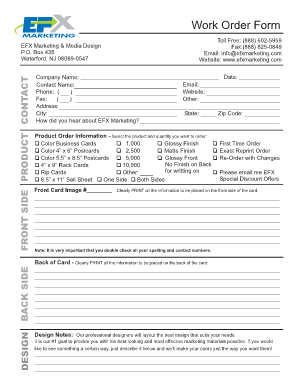
- Begin by filling out the front side product contact section. Input your company name, contact name, and phone number. Ensure to include your full address and how you heard about EFX Marketing.
- Select the product order information, indicating the product type and the desired quantity. Ensure you check the options for finishes as needed.
- Clearly print all the necessary information to be placed on the front side of the card. Double-check all spelling and contact numbers for accuracy.
- Move to the design section for the back side of the card. Provide information to be featured on the back, alongside any specific design notes or requests.
- Choose a font style for the card from the provided list and review the associated charges, including cost of goods, shipping, and sales tax.
- Complete the payment authorization section by filling out credit card information or selecting alternative payment methods. Ensure to sign the section, indicating your agreement to EFX Marketing’s terms and conditions.
- After reviewing your filled-out form for accuracy, save your changes, download a copy for your records, and share the form via fax to EFX Marketing at (888) 825-0849.
Complete your Work Order Form online today to streamline your order process.
Insert footnotes and endnotes Click where you want to reference to the footnote or endnote. On the References tab, select Insert Footnote or Insert Endnote. Enter what you want in the footnote or endnote. Return to your place in the document by double-clicking the number or symbol at the beginning of the note.