Loading
Form preview
  • US Legal Forms
  • Form Library
  • More Forms
  • More Uncategorized Forms
  • Sar 7 Online Kern County

Get Sar 7 Online Kern County

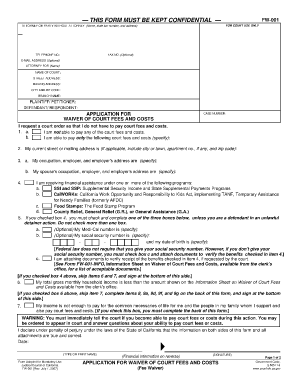
THIS FORM MUST BE KEPT CONFIDENTIAL FW-001 FOR COURT USE ONLY ATTORNEY OR PARTY WITHOUT ATTORNEY (Name, state bar number, and address): FAX NO. (Optional): TELEPHONE NO.: E-MAIL ADDRESS (Optional):.

How it works

  1. Open form

    Open form follow the instructions

  2. Easily sign form

    Easily sign the form with your finger

  3. Share form

    Send filled & signed form or save

How to fill out the Sar 7 Online Kern County online

This guide provides a clear and supportive approach to filling out the Sar 7 Online Kern County. Whether you are seeking a waiver for court fees or need assistance with financial disclosures, this comprehensive walkthrough will help you navigate each section with ease.

Follow the steps to complete your Sar 7 Online form effectively.

  1. Click the ‘Get Form’ button to access the Sar 7 Online Kern County form and load it into your editor.
  2. Begin by filling out your personal information at the top of the form, including your name, address, and contact details. Ensure that all information is accurate and up-to-date.
  3. Indicate whether you are a Plaintiff/Petitioner or Defendant/Respondent by checking the appropriate box.
  4. Proceed to the section requesting a waiver of court fees. Clearly state your financial situation, specifying whether you can pay court fees or costs in full or only partially.
  5. Provide your current address, including city, town, apartment number (if applicable), and zip code.
  6. Detail your occupation, as well as your employer’s name and address. If applicable, also include the same information for your partner.
  7. Indicate any financial assistance you are receiving by checking the relevant programs, such as SSI, CalWORKs, or Food Stamps. Provide any required additional information, like your Medi-Cal number or Social Security number, if applicable.
  8. Complete the income section, specifying your gross monthly pay, payroll deductions, and total monthly income. Remember to detail all sources of income.
  9. Provide detailed information regarding all household members, their ages, relationships, and their gross monthly incomes.
  10. List any property you own, including cash, bank accounts, vehicles, and real estate, along with their fair market values.
  11. Outline your monthly expenses, detailing categories like rent, food, transportation, and any other necessary expenditures.
  12. If there are any special circumstances or facts that support your application, describe them in the relevant section.
  13. Finally, review your entire application for accuracy, sign, and date the form at the bottom.
  14. Once completed, you can save your changes, download, print, or share the filled-out form as needed.

Complete your Sar 7 Online Kern County form today to ensure your financial needs are addressed effectively.

Get form

Experience a faster way to fill out and sign forms on the web. Access the most extensive library of templates available.
Get form

Related content

SAR 7 Eligibility Status Report - California...
County: Street address: City, State, Zip Code. BAR CODE: □ YES □ NO ... SAR 7 (12/14)...
Learn more
Sar 7 calfresh - Largest PDF Library
sar 7 5 14 eligibility status report for cash aid and calfresh required form ... cash aid...
Learn more
Assessing Alternative Endpoints for Groundwater...
7. PERFORMING ORGANIZATION NAME(S) AND ADDRESS(ES) ... SARA. Superfund Amendment and...
Learn more

Related links form

CROWN SCHOLARS PROGRAM SCHEDULE CHANGE CARD This Process Is Glenn Grever English Education Scholarship Application

Questions & Answers

Get answers to your most pressing questions about US Legal Forms API.

Contact support

The Eligibility Status Report, also known as the SAR 7, is a report form that some CalWORKs (cash aid) and CalFresh households must complete, sign and send to the County, once a year. Benefits may be discontinued if verification of the information reported on the SAR 7 is not provided.

Can I complete my SAR 7 form online? You can download it in pdf form, fill it out and submit it online or in-person to a California Social Services Office.

Here's how it works Edit your cal fresh qr7 form online. Type text, add images, blackout confidential details, add comments, highlights and more. Sign it in a few clicks. Draw your signature, type it, upload its image, or use your mobile device as a signature pad. Share your form with others.

Benefits must be issued as soon as possible to an eligible household that files a complete SAR 7 in the last 10 days of the submit month or on the extended filing date. The EW must ensure that benefits are issued within 10 days after the normal issuance date.

Can I complete my SAR 7 form online? You can download it in pdf form, fill it out and submit it online or in-person to a California Social Services Office.

SUBMIT YOUR SAR 7 REPORT ONLINE!! Access the Your Benefits Now (YBN) website at: dpssbenefits.lacounty.gov to: Complete and submit your SAR 7 report and get a confirmation number. Check to see if your SAR 7 Report is Complete, Incomplete, or Not Received. Apply online for CalWORKs, CalFresh, and Medi-Cal.

If the household does not turn in a complete SAR 7 by the end of the first business of the seventh month after application or recertification, the household will be terminated from aid and must reapply, unless they had “good cause.” [See MPP § 63-508.63; 7 C.F.R.

Get This Form Now!

Use professional pre-built templates to fill in and sign documents online faster. Get access to thousands of forms.
Get form
If you believe that this page should be taken down, please follow our DMCA take down processhere.
Get Sar 7 Online Kern County
Get form
  • Adoption
  • Bankruptcy
  • Contractors
  • Divorce
  • Home Sales
  • Employment
  • Identity Theft
  • Incorporation
  • Landlord Tenant
  • Living Trust
  • Name Change
  • Personal Planning
  • Small Business
  • Wills & Estates
  • Packages A-Z
  • Affidavits
  • Bankruptcy
  • Bill of Sale
  • Corporate - LLC
  • Divorce
  • Employment
  • Identity Theft
  • Internet Technology
  • Landlord Tenant
  • Living Wills
  • Name Change
  • Power of Attorney
  • Real Estate
  • Small Estates
  • Wills
  • All Forms
  • Forms A-Z
  • Form Library
  • Legal Hub
  • About Us
  • Help Portal
  • Legal Resources
  • Blog
  • Affiliates
  • Contact Us
  • Delete My Account
  • Site Map
  • Industries
  • Forms in Spanish
  • Localized Forms
  • State-specific Forms
  • Forms Kit
  • Real Estate Handbook
  • All Guides
  • Notarize
  • Incorporation services
  • For Consumers
  • For Small Business
  • For Attorneys
  • USLegal
  • FormsPass
  • pdfFiller
  • signNow
  • altaFlow
  • DocHub
  • Instapage
Form Packages
  • Adoption
  • Bankruptcy
  • Contractors
  • Divorce
  • Home Sales
  • Employment
  • Identity Theft
  • Incorporation
  • Landlord Tenant
  • Living Trust
  • Name Change
  • Personal Planning
  • Small Business
  • Wills & Estates
  • Packages A-Z
Form Categories
  • Affidavits
  • Bankruptcy
  • Bill of Sale
  • Corporate - LLC
  • Divorce
  • Employment
  • Identity Theft
  • Internet Technology
  • Landlord Tenant
  • Living Wills
  • Name Change
  • Power of Attorney
  • Real Estate
  • Small Estates
  • Wills
  • All Forms
  • Forms A-Z
  • Form Library
Customer Service
  • Legal Hub
  • About Us
  • Help Portal
  • Legal Resources
  • Blog
  • Affiliates
  • Contact Us
  • Delete My Account
  • Site Map
  • Industries
  • Forms in Spanish
  • Localized Forms
  • State-specific Forms
  • Forms Kit
Legal Guides
  • Real Estate Handbook
  • All Guides
Prepared for you
  • Notarize
  • Incorporation services
Our Customers
  • For Consumers
  • For Small Business
  • For Attorneys
Our Sites
  • USLegal
  • FormsPass
  • pdfFiller
  • signNow
  • altaFlow
  • DocHub
  • Instapage
Social Media
Call us now toll free:
+1 833 426 79 33
As seen in:
© Copyright 1999-2026 airSlate Legal Forms, Inc. 3720 Flowood Dr, Flowood, Mississippi 39232
  • Your Privacy Choices
  • Terms of Service
  • Privacy Notice
  • Content Takedown Policy
  • Bug Bounty Program