Loading
Get Ccg N702
How it works
-

Open form follow the instructions
-

Easily sign the form with your finger
-

Send filled & signed form or save
How to fill out the Ccg N702 online
The Ccg N702 is a vital legal document used in the Circuit Court of Cook County, Illinois. This guide provides users with a clear, step-by-step approach to filling out the form online, ensuring accuracy and compliance with legal requirements.
Follow the steps to fill out the Ccg N702 form effectively
- Click 'Get Form' button to obtain the form and open it in the editor.
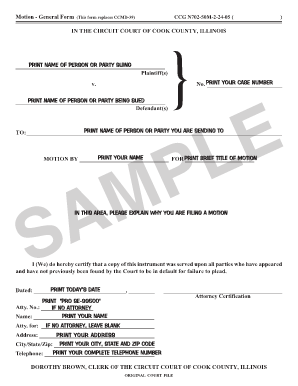
- Enter the name of the person or party suing in the designated field for 'Plaintiff(s)'. Make sure to print the name clearly.
- Input the name of the person or party being sued in the 'Defendant(s)' section. Ensure accuracy to avoid delays.
- Fill in your case number in the specified area to help identify your case within the court system.
- Provide the name of the person you are sending this motion to in the appropriate section. This could be the court or a specific individual relevant to the case.
- Record your name in the designated field. This helps verify your identity as the person filing the motion.
- In the section labeled 'Brief title of motion,' include a short phrase summarizing the purpose of your motion for clarity.
- Describe the reasons for filing the motion in the allocated area. Be concise yet thorough, outlining your rationale.
- Certify that a copy of the motion has been served to all parties by checking this statement. This ensures compliance with court procedures.
- Print today’s date in the designated area to document when the motion is filed.
- If you are filing without an attorney, print 'PRO SE-99500' in the appropriate field. Otherwise, leave it blank.
- If applicable, provide your attorney's number in the designated field, or leave it blank if you do not have legal representation.
- Print the address, city, state, and zip code of where you can be reached in the relevant fields.
- Finally, enter your complete telephone number in the provided space for easy communication.
- Review all entered information for accuracy before finalizing your document. Once confirmed, you can save changes, download, print, or share the form.
Complete your documents online with confidence and ensure proper submission.
A Notice of Motion tells the other parties in your court case that you've asked the judge to do something in the case.