Loading
Get T2057
How it works
-

Open form follow the instructions
-

Easily sign the form with your finger
-

Send filled & signed form or save
How to fill out the T2057 online
Filling out the T2057 form can seem daunting, but with clear guidance, you can complete it confidently. This document serves as a guide to help you navigate the process of completing the T2057 online, ensuring that you understand each component and field.
Follow the steps to complete the T2057 form effectively.
- Press the ‘Get Form’ button to access the T2057 document and open it in your preferred online editor.
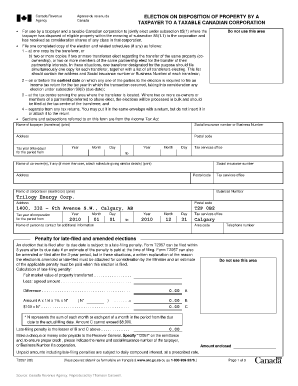
- Begin by filling in the 'Name of taxpayer (transferor)' field. This should contain the full name of the taxpayer involved in the transaction.
- Enter the 'Social insurance number or Business Number' for the taxpayer, ensuring that this information is accurate.
- Fill in the 'Address' and 'Postal code' fields to provide the taxpayer's current contact information.
- Specify the 'Tax year of taxpayer' for the relevant period, indicating the start and end dates using the appropriate month, day, and year fields.
- If there are any co-owners, list their names in the 'Name of co-owner(s), if any' section. Ensure to capture their Social insurance numbers and addresses as well.
- Input the name and 'Business Number' of the corporation (transferee) in the designated fields.
- Provide the address and postal code for the transferee corporation to complete their identification.
- Detail the 'Tax year of corporation' indicating the correct period using the month, day, and year fields.
- Complete the 'Name of person to contact for additional information' field along with their telephone number, ensuring to include the area code.
- Follow the prompts in the sections about the particulars of the eligible property disposed of, listing the details as required.
- Once all fields are filled out, review the document for accuracy. Save changes, and if necessary, download or print the completed form for submission.
Complete the T2057 online today to ensure a smooth filing process.
Form T2057 allows you to transfer property that you own to a taxable Canadian corporation. If you and a corporation make a T2507 election (that is, you both agree to the transfer) the corporation must offer you shares (or a fraction of a share) of that corporation as consideration for the property.
Industry-leading security and compliance
US Legal Forms protects your data by complying with industry-specific security standards.
-
In businnes since 199725+ years providing professional legal documents.
-
Accredited businessGuarantees that a business meets BBB accreditation standards in the US and Canada.
-
Secured by BraintreeValidated Level 1 PCI DSS compliant payment gateway that accepts most major credit and debit card brands from across the globe.