Loading
Get Financial Sponsor Statement Form - Xavier University - Xavier
How it works
-

Open form follow the instructions
-

Easily sign the form with your finger
-

Send filled & signed form or save
How to fill out the FINANCIAL SPONSOR STATEMENT FORM - Xavier University - Xavier online
Completing the Financial Sponsor Statement Form is an essential step for students seeking financial sponsorship for their studies at Xavier University. This guide provides a clear and detailed explanation of how to accurately fill out each section of the form online, ensuring a smooth submission process.
Follow the steps to complete the form effectively.
- Click the ‘Get Form’ button to obtain the Financial Sponsor Statement Form and open it in your preferred editor.
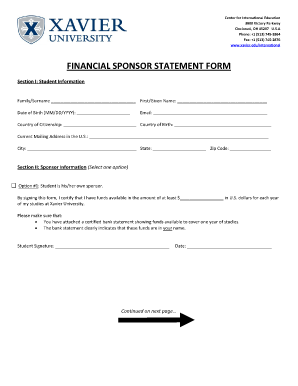
- In Section I, provide your student information. Fill in your family surname, first or given name, date of birth, email address, country of citizenship, country of birth, and current mailing address in the U.S. Make sure to include the city, state, and zip code.
- In Section II, select whether you are your own sponsor or if you have multiple sponsors. If you are your own sponsor, indicate the amount of funds available for your studies at Xavier University. Ensure that this amount meets the minimum requirement.
- If you are sponsored by multiple sponsors, note that each sponsor must complete their section of the form. If a sponsor is located in the U.S., their form must be notarized. Each sponsor should also attach a certified bank statement that validates their portion of funding.
- Provide the required information for each sponsor, including the family surname, first name, phone number, email, relationship to the student, and current mailing address. Each sponsor must affirm the amount of funds they are willing to provide.
- Make sure that each sponsor signs and dates their respective sections of the form. If applicable, include the notary information and seals where required.
- Review the entire form for accuracy, ensuring that all required fields are completed. Once finished, save your changes, and then download the form to have a copy for your records.
- Print the original completed form and submit it to Xavier University at the specified address in the Center for International Education.
Complete your Financial Sponsor Statement Form online today for a seamless application process.
Call our office at (513) 745-3142, or send a message to xufinaid@xavier.edu.