Loading
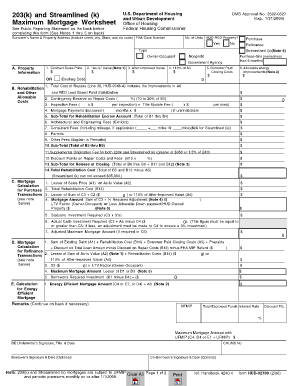
Get 203k Maximum Mortgage Worksheet
How it works
-

Open form follow the instructions
-

Easily sign the form with your finger
-

Send filled & signed form or save
How to fill out the 203k Maximum Mortgage Worksheet online
Completing the 203k Maximum Mortgage Worksheet online is an essential step for obtaining a 203k or Streamlined (k) mortgage. This guide will walk you through the process, ensuring that you can confidently complete each section of the form.
Follow the steps to complete your worksheet efficiently.
- Click the ‘Get Form’ button to obtain the form and open it in your editor.
- Enter the borrower's name and property address, including the street, city, state, and zip code. Make sure to include the FHA Case Number for accurate processing.
- Indicate if the property is HUD-REO by selecting 'Yes' or 'No'. Specify whether you are applying for a purchase or refinance.
- In section A, provide the contract sales price, 'As-Is' value, and after-improved value. Calculate 110% of the after-improved value as part of your input.
- Document the allowable energy improvements and total cost of repairs in section B. Include all relevant costs such as inspection fees, architectural fees, and any additional permits.
- In section C, calculate the mortgage amount based on the lesser of sales price or 'As-Is' value and the total rehabilitation cost. Ensure accuracy, as this will impact your maximum mortgage eligibility.
- Conclude filling out the form by entering the energy efficient mortgage amount, if applicable. Review all entries for accuracy.
- Once completed, save your changes. You can download, print, or share the form as needed.
Get started on your 203k Maximum Mortgage Worksheet online today!
Related links form
Can I do the work myself on an FHA 203k Loan? YES, NO, & IT DEPENDS. ... Contractor estimates are still required and the loan amount is usually based on those estimates. Monies saved or not spent can be allocated to cost overruns, additional improvements, or a one-time principle balance reduction.