Loading
Get Research & Related Budget Form
How it works
-

Open form follow the instructions
-

Easily sign the form with your finger
-

Send filled & signed form or save
How to use or fill out the Research & Related Budget Form online
This guide provides a comprehensive overview of how to fill out the Research & Related Budget Form online, ensuring that you understand each section and field. By following these detailed instructions, users can effectively manage their research budgets with confidence.
Follow the steps to accurately complete the Research & Related Budget Form online:
- Click ‘Get Form’ button to obtain the form and open it in the editor.
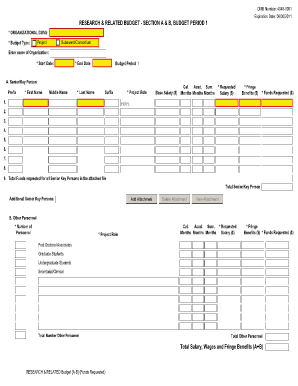
- Enter your organizational DUNS number in the appropriate field. This unique number identifies your organization for federal funding.
- Specify the budget type, indicating whether the budget is for a direct project, subaward, or consortium.
- Provide the name of your organization in the designated field. This should reflect the entity responsible for the research project.
- Fill in the start date and end date for Budget Period 1, ensuring these dates align with your project timeline.
- In Section A, list the senior/key personnel involved in your project. Include the prefix, first name, middle name, last name, and suffix for each individual.
- For each key person listed, indicate their project role, base salary, and requested salary. Be sure to calculate fringe benefits and total funds requested for each individual.
- Then, move to Section B where you will input details for other personnel. Specify the number of personnel and their project roles, including requested salaries and fringe benefits.
- Proceed to Section C to describe any equipment you plan to purchase. List items exceeding $5,000 along with their costs.
- In Section D and E, fill out travel and participant/trainee support costs by indicating travel types and total costs associated with participation.
- Complete Section F for other direct costs, detailing materials, publications, consultant services, and any other relevant expenses.
- Finalize your budget by reviewing all provided totals for direct and indirect costs, ensuring totals are accurate and submitted correctly.
- At the end of the form, you can save changes, download the completed document, print it for your records, or share it with relevant parties.
Complete your Research & Related Budget Form online today to ensure your project funding is well-organized and submitted on time.
Related links form
A research report has seven components: Abstract or Summary. Introduction. Review of Literature. Methods. Results. Conclusions and Discussion. References.