Loading
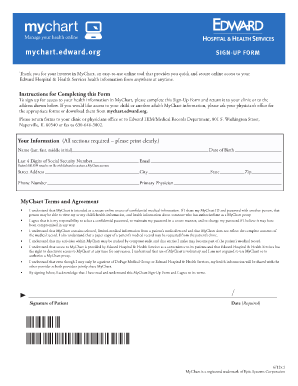
Get Edward Hospital My Chart
How it works
-

Open form follow the instructions
-

Easily sign the form with your finger
-

Send filled & signed form or save
How to fill out the Edward Hospital My Chart online
This guide provides a comprehensive walkthrough for users on how to fill out the Edward Hospital My Chart Sign-Up Form online. By following these steps, you can ensure that your access to health information is set up smoothly and securely.
Follow the steps to complete the Edward Hospital My Chart Sign-Up Form.
- Click ‘Get Form’ button to obtain the form and open it in the editor.
- Begin by filling out your personal information in the 'Your Information' section. Ensure to provide your name, date of birth, last four digits of your Social Security Number, email, street address, city, state, zip code, and phone number. It is important to print clearly to avoid any errors.
- Indicate your primary physician's name in the designated field. This information helps in linking your My Chart account to the correct medical provider.
- Review the My Chart Terms and Agreement carefully. Make sure you understand each point, as it covers the responsibilities regarding the confidentiality of your health information and the use of your My Chart account.
- Sign the form where indicated to acknowledge that you have read and agreed to the terms outlined. Don’t forget to include the date next to your signature.
- Once the form is completely filled out, you can save the changes, download it for your records, print a hard copy, or share it as needed. Finally, return the completed form to your clinic or the specified address for processing.
Start your My Chart registration today by completing the Sign-Up Form online.
Related links form
Payment is a dollar amount paid on any debt or allowance. A settlement is a payment or payments that will conclude the financial obligation in full, thus finishing the agreed term and amount in total.