Loading
Get Arcmarketplacecomaboutcomjsp Form
How it works
-

Open form follow the instructions
-

Easily sign the form with your finger
-

Send filled & signed form or save
How to fill out the Arcmarketplacecomaboutcomjsp Form online
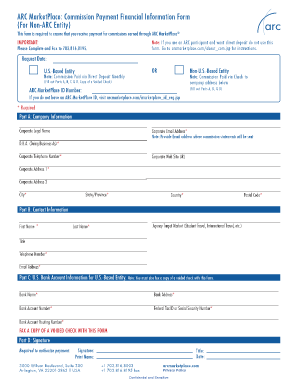
Filling out the Arcmarketplacecomaboutcomjsp Form is essential for ensuring you receive your commissions earned through ARC MarketPlace. This guide provides clear instructions to help you complete the form accurately and efficiently.
Follow the steps to complete the Arcmarketplacecomaboutcomjsp Form online.
- Click the ‘Get Form’ button to access the form and open it in your document editor.
- Begin by entering the request date in the designated field to indicate when you are submitting the form.
- Part A: Fill out the company information including your corporate legal name, corporate email address, and telephone number. Ensure that you provide the correct email address where commission statements will be sent.
- Complete additional fields in Part A: D.B.A. (Doing Business As), corporate website URL, corporate address (1 and 2), city, state/province, country, and postal code.
- Move to Part B: Input your contact information, including first name, last name, title, telephone number, and email address.
- If you are a U.S.-based entity, proceed to Part C: Provide your U.S. bank account information. This includes the bank name, bank address, account number, federal tax ID or social security number, and bank account routing number. Do not forget to fax a copy of a voided check with this form.
- In Part D: Sign and print your name to authorize payment. Include your title and the date of signing.
- Once all sections are completed, review the form for accuracy. Save your changes, then download, print, or share as required. Finally, fax the completed form to 703.816.8195.
Complete your documents online to ensure timely payment of your commissions.
process. jsp <%@page import="bean.RegisterDao"%> <jsp:useBean id="obj" class="bean.User"/> <jsp:setProperty property="*" name="obj"/> <% int status=RegisterDao.register(obj); if(status>0) out.print("You are successfully registered"); %>
Industry-leading security and compliance
US Legal Forms protects your data by complying with industry-specific security standards.
-
In businnes since 199725+ years providing professional legal documents.
-
Accredited businessGuarantees that a business meets BBB accreditation standards in the US and Canada.
-
Secured by BraintreeValidated Level 1 PCI DSS compliant payment gateway that accepts most major credit and debit card brands from across the globe.