Loading
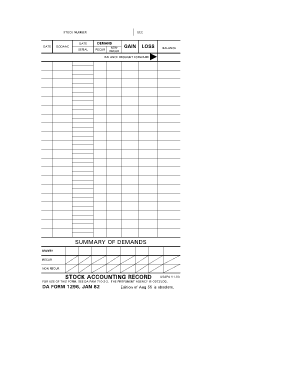
Get Da Form 3032
How it works
-

Open form follow the instructions
-

Easily sign the form with your finger
-

Send filled & signed form or save
How to fill out the Da Form 3032 online
This guide provides step-by-step instructions on how to fill out the Da Form 3032 online. By following these instructions, you will ensure that your form is completed accurately and efficiently.
Follow the steps to fill out the Da Form 3032 online.
- Press the ‘Get Form’ button to obtain the form and open it in your editing tool.
- Input the stock number in the designated field, which is essential for identifying the item.
- Fill in the date fields accurately to reflect the reporting date for the stocks.
- Enter the SCC (Stock Control Code) for proper categorization of inventory.
- Complete the demand section by detailing any requests for stock items.
- Input the DODAAC (Department of Defense Activity Address Code) to specify the activity requesting the stock.
- Record the serial number of the items for tracking purposes.
- Indicate whether the stock is recurrent or non-recurrent, entering the appropriate information.
- Document any gains or losses related to stock for accurate accounting.
- Complete the balance carried forward to maintain a clear record of inventory amounts.
- Fill out the summary of demands, capturing the monthly totals for recurring and non-recurring items.
- Once all information has been correctly entered, save your changes to ensure all entries are recorded.
- Download or print the completed form for your records or to submit it as required.
- Share the completed form with relevant partners if needed.
Complete your documents online today to stay organized and ensure accuracy.
Related links form
DA Form 2142, Pay Inquiry, is a document submitted by the service members when they have questions or concerns regarding their payments.
Industry-leading security and compliance
US Legal Forms protects your data by complying with industry-specific security standards.
-
In businnes since 199725+ years providing professional legal documents.
-
Accredited businessGuarantees that a business meets BBB accreditation standards in the US and Canada.
-
Secured by BraintreeValidated Level 1 PCI DSS compliant payment gateway that accepts most major credit and debit card brands from across the globe.