Loading
Get Protective Life Policy Service Request Form
How it works
-

Open form follow the instructions
-

Easily sign the form with your finger
-

Send filled & signed form or save
How to fill out the Protective Life Policy Service Request Form online
This guide provides clear and detailed instructions on how to complete the Protective Life Policy Service Request Form online. Whether you need to update your policy information or request a transaction, this step-by-step approach will help you navigate each section of the form with confidence.
Follow the steps to successfully complete your service request form.
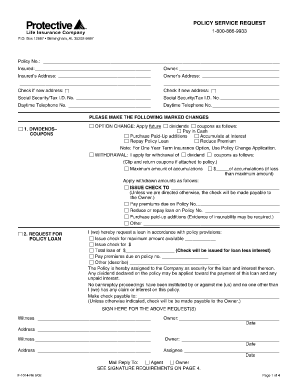
- Click ‘Get Form’ button to access the Protective Life Policy Service Request Form and open it in your editing tool.
- Begin by entering the policy number in the designated field. This is essential for identifying your specific insurance policy.
- Input the insured's address and owner's address. If either address has changed, be sure to check the corresponding box indicating a new address.
- Enter the Social Security or Tax I.D. numbers for both the insured and owner in the provided fields. This information is necessary for proper identification.
- In the section requesting changes, check the appropriate boxes to indicate the changes you wish to make, such as withdrawing dividends or changing a beneficiary.
- For changes of beneficiaries, provide the names and relationships of the primary and contingent beneficiaries. Include addresses and percentage allocations if applicable.
- Ensure all required signatures are provided, according to the instructions, including date and witness signatures where needed.
- Review the entire form for accuracy and completeness. Once satisfied, save your changes. You may download, print, or share the completed form as needed.
Complete your Protective Life Policy Service Request Form online today for a smooth and efficient process.
If you would like to speak to a customer service representative, please call 800-866-9933.