Loading
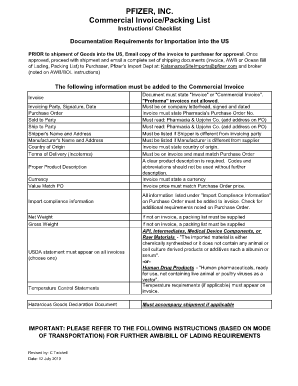
Get Pfizer, Inc. Commercial Invoice/packing List
How it works
-

Open form follow the instructions
-

Easily sign the form with your finger
-

Send filled & signed form or save
How to fill out the PFIZER, INC. Commercial Invoice/Packing List online
Filling out the PFIZER, INC. Commercial Invoice/Packing List accurately is crucial for ensuring smooth importation processes. This guide provides clear instructions on how to complete the form online, so you can efficiently manage your documentation needs.
Follow the steps to complete your commercial invoice and packing list online.
- Click ‘Get Form’ button to obtain the form and open it in the online editor.
- Begin by entering the invoicing party's name, along with their signature and date. This validates the invoice and shows that it has been approved by the appropriate individual.
- Fill in the purchase order number. Ensure this number matches the one on the purchase order documentation to avoid discrepancies.
- Specify the sold to party, who is the recipient of the goods, followed by the ship to party details, which indicate the destination of the shipment.
- Add the shipper's name and address, making sure it accurately reflects the sender’s information for shipping purposes.
- Include the manufacturer's name and address to identify where the products are sourced from.
- Indicate the country of origin for the goods. This is important for customs compliance.
- State the terms of delivery (Incoterms), which delineates the responsibilities of the buyer and seller during the shipping process.
- Provide a proper product description. Avoid using codes or abbreviations without sufficient clarification.
- Select the currency in which the transaction will occur and ensure this aligns with the purchase order.
- Confirm that the value matches the purchase order price to ensure consistency in the documentation.
- Include the necessary import compliance information as specified in the purchase order. This may involve additional details that are crucial for customs.
- List the net weight and gross weight of the shipment. This can impact shipping costs and complies with regulatory requirements.
- Make sure that all relevant statements appear on the invoice, including certification for temperature control if applicable, and a hazardous goods declaration if necessary.
- Verify that the invoice states 'Invoice' or 'Commercial Invoice.' Proforma invoices are not acceptable. Ensure the document is on company letterhead, signed, and dated as per regulations.
- After completing the form, save changes. You can then download, print, or share the finished document, ensuring it is ready for submission.
Start completing your PFIZER, INC. Commercial Invoice/Packing List online today to streamline your importation process!
Get form
Experience a faster way to fill out and sign forms on the web. Access the most extensive library of templates available.
A packing slip is used to denote the physical goods being received, where an invoice is the financial document of the order, containing information like how much money each product was sold for, the payment terms, payment method, and date. In some cases, a packing slip and invoice are intended for different people.
Get This Form Now!
Use professional pre-built templates to fill in and sign documents online faster. Get access to thousands of forms.