Loading
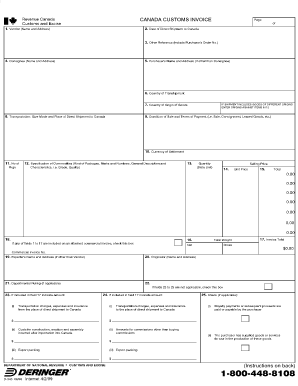
Get Department Of National Revenue Customs And Excise Canada Customs Invoice
How it works
-

Open form follow the instructions
-

Easily sign the form with your finger
-

Send filled & signed form or save
How to fill out the Department Of National Revenue Customs And Excise Canada Customs Invoice online
Filling out the Department Of National Revenue Customs And Excise Canada Customs Invoice online is a straightforward process designed to facilitate the importation and exportation of goods. This guide provides clear, step-by-step instructions to help you accurately complete the form and ensure compliance with customs regulations.
Follow the steps to complete the customs invoice accurately.
- Click ‘Get Form’ button to obtain the customs invoice form and open it in your document manager.
- Carefully read the introduction section of the form, which outlines important guidelines for filling out the invoice.
- In section 1, provide the name and address of the exporter. This is typically the individual or business sending the goods.
- In section 2, fill in the details of the consignee, the individual or business receiving the goods at the destination. Ensure that this information is accurate to prevent delivery issues.
- Section 3 requires a description of the goods being shipped. Include details such as the type of product, quantity, and value. Use clear and specific language to avoid confusion.
- In section 4, indicate the method of shipping (e.g., air, sea, ground) and the expected date of arrival. This section helps customs officials track the shipment.
- Complete section 5 by specifying the country of origin for the goods. This information is vital for determining applicable tariffs.
- Fill in the declared value and total duty on the goods in section 6. Be truthful about the monetary value to comply with customs regulations.
- Review all entered information in sections 1 through 6 for accuracy and completeness. Mistakes can lead to customs delays or fines.
- Once all sections are complete, save your changes. You can download, print, or share the customs invoice as needed.
Start completing your customs invoice online today for a seamless shipping experience.
Related links form
The CBSA will not review or approve commercial invoices or privately printed customs invoices. It is the responsibility of the importer or owner to ensure that all the information listed on a CCI is provided to customs at the time of release.
Industry-leading security and compliance
US Legal Forms protects your data by complying with industry-specific security standards.
-
In businnes since 199725+ years providing professional legal documents.
-
Accredited businessGuarantees that a business meets BBB accreditation standards in the US and Canada.
-
Secured by BraintreeValidated Level 1 PCI DSS compliant payment gateway that accepts most major credit and debit card brands from across the globe.