Loading
Get Omb 0960 0277
This website is not affiliated with any governmental entity
How it works
-

Open form follow the instructions
-

Easily sign the form with your finger
-

Send filled & signed form or save
How to fill out the Omb 0960 0277 online
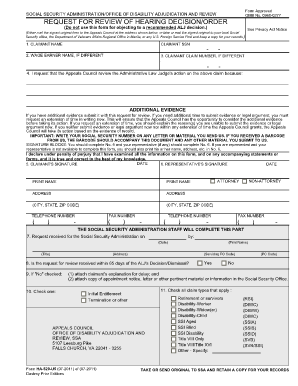
The Omb 0960 0277 form is a vital document for requesting a review of an Administrative Law Judge's decision regarding your claim. This guide provides clear, step-by-step instructions to help you complete the form online, ensuring that you submit your request accurately and efficiently.
Follow the steps to fill out the Omb 0960 0277 online effectively.
- Press the ‘Get Form’ button to access the Omb 0960 0277 form and open it in your chosen online document editor.
- Begin by entering the claimant's name in the designated field at the top of the form. This should match the name on your Social Security records.
- Next, input the claimant's Social Security Number (SSN) in the corresponding section to link the request to the correct file.
- If the wage earner's name is different from the claimant's, fill in their name in the appropriate field.
- Fill in the claimant's claim number, if it differs from their SSN. This ensures that the Appeals Council reviews the correct claim.
- In section four, clearly state your reasons for requesting the review of the Administrative Law Judge's decision. Be concise and specific.
- If applicable, attach any additional evidence you wish to submit with your request. If you need more time to gather evidence or present a legal argument, request an extension in this section.
- Complete the signature blocks by providing the claimant's signature and date. If you are represented, include your representative's details in the following blocks as well.
- If the request for review is outside of the 65-day window, complete the required additional documentation to explain the delay.
- Review all information for accuracy and completeness before finalizing your form.
- Once completed, save your changes, and you can choose to download, print, or share the form as necessary.
Take the next step — complete the Omb 0960 0277 form online today.
The fastest and easiest way to request an appeal is to submit a request online, but appeal forms are also available for download at .ssa.gov/forms. You can also call our toll-free number, 1-800-772-1213 (TTY 1-800-325-0778), or contact your local Social Security office to request appeal forms.
Industry-leading security and compliance
US Legal Forms protects your data by complying with industry-specific security standards.
-
In businnes since 199725+ years providing professional legal documents.
-
Accredited businessGuarantees that a business meets BBB accreditation standards in the US and Canada.
-
Secured by BraintreeValidated Level 1 PCI DSS compliant payment gateway that accepts most major credit and debit card brands from across the globe.