Loading
Get Group Size 2-50 Eligible Employees
How it works
-

Open form follow the instructions
-

Easily sign the form with your finger
-

Send filled & signed form or save
How to fill out the Group Size 2-50 Eligible Employees online
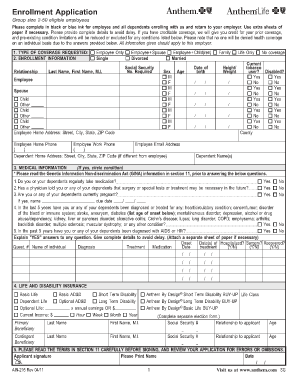
Filling out the Group Size 2-50 Eligible Employees form is an important step in securing health insurance for yourself and your dependents. This guide provides clear instructions on how to accurately complete the form online, ensuring a smooth enrollment process.
Follow the steps to fill out the form accurately.
- Press the ‘Get Form’ button to access the form and open it for editing.
- Begin by selecting the type of coverage you are requesting in the designated section. Options include Employee Only, Employee + Spouse, Employee + Child(ren), Family, Life Only, and No Coverage. Ensure you choose the appropriate option as this might affect coverage and premiums.
- In the Enrollment Information section, provide your personal details including your last name, first name, middle initial, sex, age, and a social security number. Indicate your height, weight, and whether you currently use tobacco. For each dependent, fill in their respective details.
- Complete the Medical Information section by answering all questions about regular medication, surgeries, pregnancies, and any diagnoses in the past five years. If you answer 'Yes' to any questions, provide detailed explanations on a separate sheet if necessary.
- Navigate to the Life and Disability Insurance section where you can indicate selections for Basic Life and Disability coverage. Complete details for primary and contingent beneficiaries.
- Fill in the Reason for Application—whether it's New Enrollment, Open Enrollment, or due to a Qualifying Event like marriage or a birth. Provide the event date and reason if applicable.
- Select your desired coverage options in the Coverage Selection section. This includes choices for Medical, Dental, and Vision coverage and may vary based on employer offerings.
- If you are waiving any coverage for yourself or your dependents, complete the Waiver of Coverage section by identifying the reason for declining coverage.
- Provide details about any prior health insurance in the Prior Health Insurance Information section, including policy numbers and insurance company names.
- Before signing, carefully read and understand the Significant Terms, Conditions, and Authorizations section. Then, sign your name and date the application to finalize it.
- Upon completing all sections, ensure all changes are saved. You may download, print, or share the form as needed after submission.
Complete your enrollment form online today to secure health coverage for you and your dependents.
To be eligible for small business health insurance, a company must have between one and 50 employees. That is considered a small business for purposes of purchasing group health insurance. If you have more than 50 employees, you'll need to: apply for large group coverage.