Loading
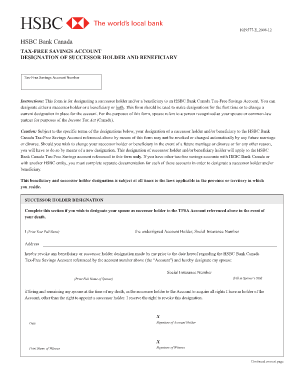
Get Hsbc Beneficiary
How it works
-

Open form follow the instructions
-

Easily sign the form with your finger
-

Send filled & signed form or save
How to fill out the Hsbc Beneficiary online
This guide provides comprehensive instructions for completing the Hsbc Beneficiary form online. It aims to ensure that users understand and can effectively designate a successor holder and/or beneficiary for their HSBC Bank Canada Tax-Free Savings Account.
Follow the steps to accurately complete the Hsbc Beneficiary form.
- Press the ‘Get Form’ button to access the form and open it in your preferred editor.
- Begin by filling in the Tax-Free Savings Account number at the top of the form to identify the account in question.
- Under the successor holder designation section, print your full name as the account holder, followed by your Social Insurance Number and address.
- Indicate your intention to revoke any previous designations by checking the relevant box.
- Designate your spouse as the successor holder by filling in their Social Insurance Number and full name. Confirm their current status as your spouse.
- Sign and date the form, ensuring that a witness also signs and prints their name.
- Move to the beneficiary designation section. Again, print your full name, Social Insurance Number, and address.
- Revoke any prior beneficiary designations by checking the corresponding box.
- Designate the beneficiary by indicating their relationship to you and printing their full name, confirming they are alive at the time of your death.
- As in the previous section, sign and date this part of the form, ensuring a witness provides their signature and printed name.
- Once all details are completed accurately, ensure you save your changes, download, print a copy for your records, or share it as needed.
Complete your Hsbc Beneficiary form online today to ensure your account designations are properly managed.
You can add a beneficiary or a payable-on-death (POD) to most savings and checking accounts. ... Call the bank directly to ask how you can designate beneficiaries for each of your accounts. Unfortunately, some banks (including ING Direct) doesn't allow account holders to designate beneficiaries.