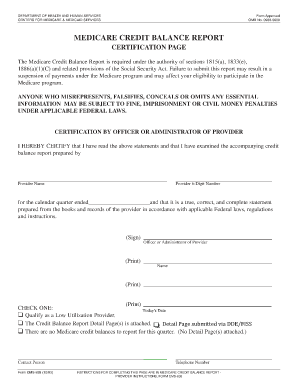
Telephone Number. Form CMS-838 (10/03). Form CMS-838 (10/03). INSTRUCTIONS FOR COMPLETING THIS PAGE ARE IN MEDICARE CREDIT BALANCE .

How it works
  • Open form

    Open form follow the instructions

  • Easily sign form

    Easily sign the form with your finger

  • Share form

    Send filled & signed form or save

How to fill out the Cms 838 Fillable Form online

Filling out the Cms 838 Fillable Form online is an essential process for reporting Medicare credit balances. This guide provides clear instructions to help you navigate each section of the form accurately and efficiently.

Follow the steps to complete the Cms 838 Fillable Form online.

  1. Press the ‘Get Form’ button to retrieve the form and open it in the online editor.
  2. Begin by providing the necessary information in the certification section. Here, the officer or administrator of the provider must print their name, sign the form, and indicate their title.
  3. Fill out the provider information, including the provider name and their 6-digit number. Make sure these details are accurate to avoid any processing issues.
  4. In the section for the calendar quarter, specify the relevant date accurately. This ensures that the report pertains to the correct reporting period.
  5. Select one of the options provided under 'CHECK ONE' by marking the appropriate box. This includes either qualifying as a low utilization provider, indicating that the credit balance report detail pages are attached, or noting that there are no Medicare credit balances to report for the quarter.
  6. Complete the contact person’s details by providing their name and telephone number. This information is necessary in case the Medicare office needs to reach out for any clarifications.
  7. Once all sections are accurately filled, review the form for completeness. Ensure that all entries reflect true and correct information according to federal regulations.
  8. Make sure to save any changes you've made. You can choose to download, print, or share the completed form as needed for your records.

Complete your Cms 838 Fillable Form online today to ensure compliance and maintain your participation in the Medicare program.

Get form

Experience a faster way to fill out and sign forms on the web. Access the most extensive library of templates available.

Related content

CMS-838 Medicare Credit Balance Report

Form CMS-838 (10/03). INSTRUCTIONS FOR COMPLETING THIS PAGE ARE IN MEDICARE CREDIT BALANCE...

Learn more
VEBA Plan Enrollment Kit

Medicare Part D, and Medicare supplement plans. Go to veba.org for a more ... basic PLaN...

Learn more
Studiospares Catalogue 2014 - UserManual.wiki

Jul 17, 2017 — Studiospares Catalogue 2014 Studiospares_Catalogue_2014 catalogue CMS...

Learn more
Questions & Answers

Get answers to your most pressing questions about US Legal Forms API.

Contact support

What is a CMS form?

The Centers for Medicare & Medicaid Services (CMS) is a Federal agency within the U.S. Department of Health and Human Services. Many CMS program related forms are available in Portable Document Format (pdf).

A Credit Balance Report summarizes the Credit Balance for each Client with a detailed breakdown showing the amount issued, applied, and remaining.

The CMS-838 is specifically used to monitor identification and recovery of “credit balances” owed to Medicare. A credit balance is an improper or excess payment made to a provider as the result of patient billing or claims processing errors.

Credit Balance Report (Form CMS-838) myCGS, secure Web Portal (preferred method):Refer to the myCGS User Guide, "Chapter 7: Forms Tab " for details. myCGS provides instant confirmation of receipt.Regular and Certified Mail:CGS Attn: HHH Credit Balance Reporting P.O. Box 20014 Nashville, TN 372022 more rows

Submitting the CMS-838 Report all Medicare credit balances shown in your records regardless of when they occurred. You are responsible for reporting and repaying all improper or excess payments you have received from the time you began participating in the Medicare program.

Please be sure to include your Medicare credit balance report certification page, your completed 838, and any additional documentation along with your check. 8. Where do we send reports using other payment types? You can fax reports using other payment types to 410-891-5230 or submit through Novitasphere (JH)(JL).

2. By fax: Providers may submit the completed 838 Certification Page, Detail Page and UB04s by fax to 803-419-3277.

Get This Form Now!

Use professional pre-built templates to fill in and sign documents online faster. Get access to thousands of forms.

If you believe that this page should be taken down, please follow our DMCA take down process here.

Get Cms 838 Fillable Form