Loading
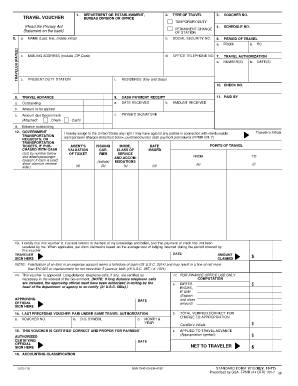
Get Travel Voucher $ Net To Traveler $ $ $ $ - Dcp Psc
How it works
-

Open form follow the instructions
-

Easily sign the form with your finger
-

Send filled & signed form or save
How to fill out the TRAVEL VOUCHER $ NET TO TRAVELER $ $ $ $ - Dcp Psc online
Completing the TRAVEL VOUCHER $ NET TO TRAVELER $ $ $ $ - Dcp Psc form online can streamline the process of claiming travel expenses. This guide provides clear, step-by-step instructions to help users fill out the form accurately and efficiently.
Follow the steps to complete your travel voucher online.
- Click the ‘Get Form’ button to access the travel voucher form. This will allow you to open the document in an online editing environment where you can input your information.
- Begin by entering the department or establishment name, bureau division, or office in the appropriate section. This identifies the organizational unit responsible for the travel.
- Next, select the type of travel you are claiming expenses for by ticking the appropriate box: temporary duty or permanent change of station.
- In the TRAVELER (PAYEE) section, fill in your name, mailing address (including ZIP code), and social security number. This is essential for identifying the individual who will receive the payment.
- Complete the Period of Travel by entering the start and end dates, as well as your present duty station and residence (city and state). Make sure these dates align with your travel authorization.
- If you received a travel advance, indicate the date received and the amount. This helps in reconciling any payments already made.
- Detail any cash payments received, including amounts applied and outstanding balances. Ensure you list all required cash receipts for transportation tickets purchased.
- Fill in the sections for travel expenses—breakfast, lunch, dinner, lodging, mileage, and other miscellaneous subsistence expenses. Specify amounts incurred for each meal, and provide a summary of total claimed expenses.
- In the certification section, sign and date the voucher, certifying that all provided information is accurate to the best of your knowledge.
- Have the approving official sign the voucher where indicated. Their approval confirms that the expenses claimed are necessary for government business.
- Finally, save your changes, download a copy for your records, and print or share the completed voucher as needed.
Complete your travel voucher online today to ensure timely reimbursement for your travel expenses.
Net to Traveler. Displays the total amount disbursed to the user for the specified travel dates.
Industry-leading security and compliance
US Legal Forms protects your data by complying with industry-specific security standards.
-
In businnes since 199725+ years providing professional legal documents.
-
Accredited businessGuarantees that a business meets BBB accreditation standards in the US and Canada.
-
Secured by BraintreeValidated Level 1 PCI DSS compliant payment gateway that accepts most major credit and debit card brands from across the globe.