Loading
Get Telecom Service Request Form
How it works
-

Open form follow the instructions
-

Easily sign the form with your finger
-

Send filled & signed form or save
How to fill out the Telecom Service Request Form online
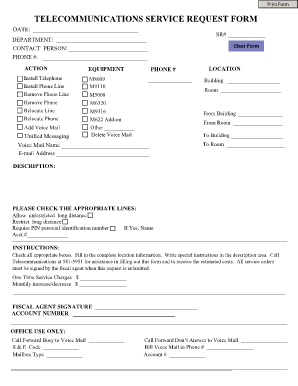
This guide will help users complete the Telecom Service Request Form online effectively and efficiently. By following these steps, users can ensure that all necessary information is accurately provided to facilitate telecommunication services.
Follow the steps to complete the Telecom Service Request Form online.
- Click ‘Get Form’ button to access the Telecom Service Request Form and open it in the editor.
- Fill in the date at the top of the form.
- Enter the service request number (SR#) in the designated field.
- Provide the department name responsible for the request.
- Enter the contact person’s name for this request.
- Fill in the contact phone number for the person listed above.
- Select the appropriate action from the equipment section by checking the boxes for the services needed, such as installing or removing telephone lines.
- If applicable, indicate the phone number associated with the request.
- Fill in the location fields, including the building and room numbers where services are required.
- Provide additional location details in the 'From Building' and 'From Room' sections if relocating services.
- Include the name for voicemail and the corresponding email address for notifications.
- Fill in any special instructions in the description area as needed.
- Check the appropriate boxes regarding long-distance service and any required identification numbers.
- Enter any applicable charges and fiscal agent information at the bottom of the form.
- Ensure the form is signed by the fiscal agent before submission.
- Once all information is completed, users can save changes, download, print, or share the filled-out form.
Complete your Telecom Service Request Form online today for seamless telecommunication services.
The NCSC's Telecoms Security Requirements (TSR) are expected to. form the technical backbone of the Code of Practice. The NCSC's TSR is a set of principles, requirements and tests. that show operators how to protect their network.