Loading
Get Chapter 90: Animal Control - Will County - Avma
How it works
-

Open form follow the instructions
-

Easily sign the form with your finger
-

Send filled & signed form or save
How to fill out the CHAPTER 90: ANIMAL CONTROL - Will County - Avma online
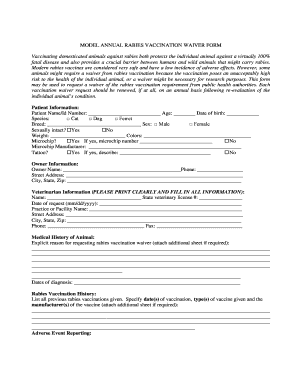
Filling out the CHAPTER 90: ANIMAL CONTROL form online is essential for users seeking a rabies vaccination waiver for their pets. This guide provides clear instructions to help users navigate each section of the form effectively.
Follow the steps to complete the form successfully
- Click ‘Get Form’ button to obtain the form and open it in the editor.
- Fill in the patient information. Provide the patient name or ID number, age, date of birth, species (select from cat, dog, or ferret), breed, sex (male or female), and whether the animal is sexually intact. Include the weight and color of the animal.
- If applicable, indicate whether the animal has a microchip, and provide the microchip number and the manufacturer if known. Additionally, specify if there is a tattoo on the animal and describe it if available.
- Input the owner's information, including the owner’s name, phone number, street address, city, state, and zip code.
- Provide the veterinarian information. Ensure to print clearly and fill in all required details, such as the veterinarian's name, state veterinary license number, date of request, practice or facility name, street address, city, state, zip code, phone number, and fax number if applicable.
- Clearly explain the explicit reason for requesting the rabies vaccination waiver. If more space is needed, attach an additional sheet.
- Document the rabies vaccination history of the animal. List all previous vaccinations, including the date of vaccination, types of vaccines used, and their manufacturers. If necessary, attach an additional sheet for more information.
- If applicable, indicate whether an adverse event has been reported to the USDA Center for Veterinary Biologics and include the date of the report if yes.
- The veterinarian must sign and date the document, confirming their professional opinion about the risk associated with administering a rabies vaccine.
- The owner of the animal must acknowledge and sign the document, confirming understanding of the waiver and the responsibilities involved.
- Finally, the public health authority will review the waiver request and either grant or deny it. The authority will sign and date the form, providing necessary details.
- Once completed, users can save changes, download, print, or share the form as needed.
Complete your rabies vaccination waiver request online to ensure your pet's safety and compliance with local regulations.
Basic rules keep your letter to the point. You need to give enough detail for your employer to be able to investigate your complaint properly. ... keep to the facts. ... never use abusive or offensive language. ... explain how you felt about the behaviour you are complaining about but don't use emotive language.