Loading
Get Ambulance Trip Sheet
How it works
-

Open form follow the instructions
-

Easily sign the form with your finger
-

Send filled & signed form or save
How to fill out the Ambulance Trip Sheet online
Filling out the Ambulance Trip Sheet online is an essential process for ensuring accurate reporting and efficient management of ambulance services. This guide will provide you with clear, step-by-step instructions to complete the form effectively.
Follow the steps to successfully complete the Ambulance Trip Sheet online.
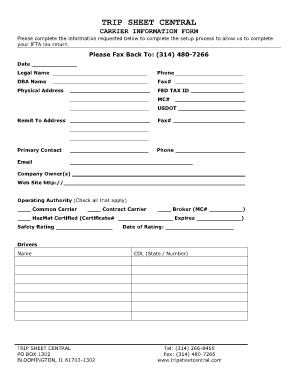
- Click ‘Get Form’ button to obtain the form and open it in your preferred editing tool.
- Begin by filling out the date field accurately, reflecting the date of the service provided.
- Enter the legal name of the organization responsible for the ambulance service, ensuring it matches official documents.
- Provide a valid phone number where your organization can be contacted.
- Input the DBA (Doing Business As) name if applicable, which may differ from the legal name.
- Fill in the fax number for easy communication and documentation transfer.
- Include the physical address of the organization; ensure all details are complete and correct.
- Enter the Federal Tax ID number for tax identification purposes.
- Fill in the MC (Motor Carrier) number and USDOT (United States Department of Transportation) number required for operational licensing.
- Specify the remit to address for billing or correspondence related to services.
- Add another fax number if necessary for communication needs.
- List the primary contact person’s name, along with their phone number and email address for direct communication.
- Document the names of the company owner(s) for ownership verification.
- Enter the organization’s website URL to provide additional information about services.
- Select the operating authority type by checking all that apply, such as common carrier, contract carrier, or broker.
- If applicable, indicate HazMat certification by providing the certificate number and safety rating.
- Fill in the expires date of the safety rating, ensuring it is current.
- Next, provide the driver's information, including their name and CDL (Commercial Driver's License) state and number.
- Complete the equipment section by entering unit number, type, VIN (Vehicle Identification Number), and year/make/model.
- Specify the owner’s name for the equipment and indicate if it is a truck or trailer.
- Once all fields are completed, review the form for accuracy, then save changes, download, print, or share the document as needed.
Complete your Ambulance Trip Sheet online today for accurate and efficient service documentation.
Related links form
Ambulance transports are included in the hospice per diem payment. Ambulance transports related to the terminal illness or related conditions should be arranged by the hospice. Payment to the ambulance supplier is the responsibility of the hospice.
Industry-leading security and compliance
US Legal Forms protects your data by complying with industry-specific security standards.
-
In businnes since 199725+ years providing professional legal documents.
-
Accredited businessGuarantees that a business meets BBB accreditation standards in the US and Canada.
-
Secured by BraintreeValidated Level 1 PCI DSS compliant payment gateway that accepts most major credit and debit card brands from across the globe.