Loading
Get Printable Attorney Timesheets
How it works
-

Open form follow the instructions
-

Easily sign the form with your finger
-

Send filled & signed form or save
How to fill out the Printable Attorney Timesheets online
Filling out the Printable Attorney Timesheets accurately is essential for timely payment and proper record-keeping. This guide provides clear instructions for each section of the timesheet, ensuring users can complete it correctly and efficiently.
Follow the steps to complete your timesheet accurately
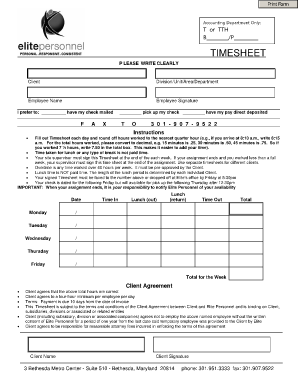
- Click the ‘Get Form’ button to obtain the Printable Attorney Timesheets and open it in your preferred editing tool.
- Begin filling out the 'Client' section with the name of the client you have worked for. Ensure this field is clear and accurate.
- In the 'Division/Unit/Area/Department' field, specify your associated division or department to clarify your work context.
- Enter your 'Employee Name' clearly as it appears in your official documentation.
- Sign the timesheet in the 'Employee Signature' section to confirm the accuracy of the hours recorded.
- Indicate your preference for check delivery by filling in the applicable option: 'have my check mailed,' 'pick up my check,' or 'have my pay direct deposited.'
- Fill out the date for each day of the week you have worked, beginning with Monday. Make sure to record the date clearly.
- In the 'Time In' sections, write the time you started work, rounded off to the nearest quarter hour (e.g., 8:10 a.m. becomes 8:15 a.m.).
- For lunch breaks, specify the 'Lunch (out)' and 'Lunch (return)' times. Remember, lunch break is not paid time.
- Record your 'Time Out' accurately to complete the daily hours worked.
- Calculate the 'Total' hours worked each day, converting the hours into decimal format (e.g., 7 ½ hours becomes 7.50).
- Add up the total hours for the week in the designated 'Total for the Week' box.
- Obtain your site supervisor's signature at the end of the week or upon completing your assignment to validate the timesheet.
- Submit the signed timesheet by faxing it to the provided number or by delivering it in person to ensure compliance with submission deadlines.
- Save your changes, download the completed form, and print or share it as necessary.
Complete your Printable Attorney Timesheets online today for a seamless filing experience.
Contact the Fraud Reporting System (Canadian Anti-Fraud Centre) or call toll-free at 1-888-495-8501. You can also file a report of a misleading or deceptive marketing practice with the Competition Bureau using the online complaint form.