Loading
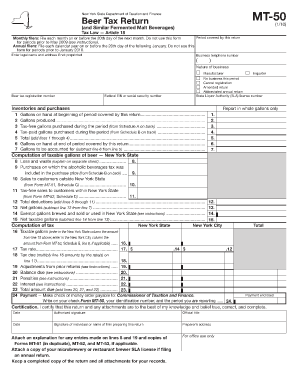
Get Mt 50 Excise Tax Form
How it works
-

Open form follow the instructions
-

Easily sign the form with your finger
-

Send filled & signed form or save
How to use or fill out the Mt 50 Excise Tax Form online
Filling out the Mt 50 Excise Tax Form online can be a straightforward process when you understand each component of the document. This guide provides step-by-step instructions to assist you in completing the form accurately and efficiently.
Follow the steps to complete the Mt 50 Excise Tax Form online.
- Click ‘Get Form’ button to obtain the form and open it in the editor.
- Enter your legal name and address if it is not preprinted on the form. Ensure that the business telephone number is filled in accurately.
- Select the nature of your business from the provided options: Manufacturer, Importer, No business this period, Cancel registration, Amended return, or Abbreviated annual return.
- Input your State Liquor Authority (SLA) license number along with your beer tax registration number, and your Federal Employer Identification Number (EIN) or Social Security number.
- Complete the section for inventories and purchases by reporting in whole gallons only. Fill in lines 1 to 7 based on the gallons on hand at the beginning of the period, gallons produced, tax-free and tax-paid gallons purchased, gallons on hand at the end of the period, and calculate the total.
- Move on to the computation of taxable gallons section. Report any losses and waste, and complete the deductions based on purchases that included alcoholic beverages tax, sales to customers outside New York State, and tax-free sales within the state.
- Calculate the net gallons after deductions and enter the exempt gallons brewed and sold or used in New York State to derive the net taxable gallons.
- Compute the tax by entering the taxable gallons into the respective New York State and New York City columns, followed by the applicable tax rate.
- Complete the payment section by adding any adjustments, penalties, and interest from prior returns, then total the amount due.
- Write your payment details on the check or money order payable to the Commissioner of Taxation and Finance, including your identification number and the reporting period.
- Certify the return by signing it, providing the date, and including the preparer's signature and address if applicable.
- After reviewing all entries for accuracy, save changes, download, print, or share the form as required.
Start completing your Mt 50 Excise Tax Form online now.
A watermark could be a logo, an image, or text, and it can be as subtle or prominent on a document or photo as you'd like. You may want your watermark to feature copyright information, an identifier like your name or logo, or status information, like “Draft," or “For Review."