Loading
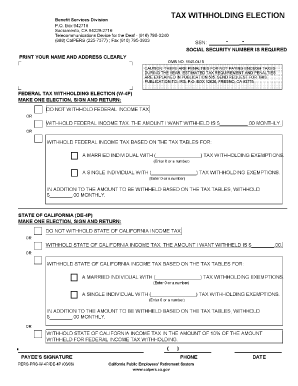
Get Calpers Tax Withholding Election Blank Form
How it works
-

Open form follow the instructions
-

Easily sign the form with your finger
-

Send filled & signed form or save
How to fill out the Calpers Tax Withholding Election Blank Form online
Filling out the Calpers Tax Withholding Election Blank Form online is essential for ensuring that your tax withholdings are set according to your preferences. This guide provides clear, step-by-step instructions to assist you in completing the form accurately and efficiently.
Follow the steps to fill out your Calpers Tax Withholding Election form online.
- Click ‘Get Form’ button to obtain the form and open it in the editor.
- Begin by entering your member payee information in Section 1. This includes your full name, CalPERS ID or Social Security Number, address, phone number, and ZIP code. Specify which account(s) you would like your election applied to.
- Move to Section 2 for federal tax withholding elections. Here, indicate whether you want federal income tax withheld. If you do, fill in the number of allowances you are claiming and your marital status. If you would like an additional amount withheld, indicate that on the appropriate line.
- Proceed to Section 3 to choose your state tax withholding options. Similar to Section 2, mark if you want state income tax withheld and provide the necessary details, including the number of allowances and any additional dollar amount you wish to withhold.
- Finally, sign and date your form in Section 4. Remember that your form will not be processed without your signature and the date.
- After filling out the form, you can save your changes, download the completed form, print it, or share it according to your needs.
Complete your Calpers Tax Withholding Election Blank Form online today to ensure your tax preferences are accurately reflected.
Most pension payments are taxable, and the amount of tax you pay depends on your total income for the year and the income tax withholding election you make. We provide you a tax form by the end of January each year that shows you how much of your CalPERS pension was taxable.