Loading
Get Printable Tax Form 8283
How it works
-

Open form follow the instructions
-

Easily sign the form with your finger
-

Send filled & signed form or save
How to fill out the Printable Tax Form 8283 online
Completing the Printable Tax Form 8283 can be straightforward with the right guidance. This form is essential for reporting information related to donated property and its dispositions. This guide will provide you with step-by-step instructions on how to accurately fill out this form online.
Follow the steps to fill out the form online.
- Click ‘Get Form’ button to obtain the form and open it in the editor.
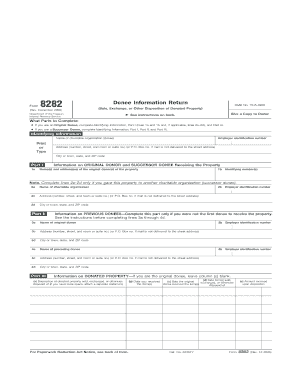
- Begin with the 'Identifying Information' section. Enter the name of the charitable organization (donee), followed by the employer identification number, and complete the address fields including street number, city, state, and ZIP code.
- Proceed to Part I and complete lines 1a and 1b. Provide the name(s) and address(es) of the original donor(s) and their identifying number(s). If necessary, fill lines 2a–2d if you are providing information on any successor donee.
- If applicable, move to Part II, which is specifically for successor donees. Fill in lines 3a through 4d to give details about the previous donees involved in the transaction.
- In Part III, detail the donated property. Describe each item in column (a). Include dates as required for when you received the item(s) and when they were sold, exchanged, or disposed of. Record the amount received upon disposition.
- Review the entire completed form for accuracy. Ensure that all required fields are filled out correctly.
- Once satisfied, save your changes. You can then choose to download, print, or share the completed form as needed.
Start filling out related documents online to ensure accurate and efficient tax submissions.
Currently, in general, the IRS allows you to deduct contributions up to 50% of your adjusted gross income (AGI) for the year. So if your AGI was $100,000, you may be able to deduct $50,000 in charitable donations.