Loading
Get Mo Shp 159
How it works
-

Open form follow the instructions
-

Easily sign the form with your finger
-

Send filled & signed form or save
How to fill out the Mo Shp 159 online
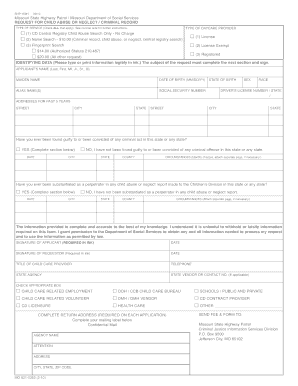
Filling out the Mo Shp 159 form is essential for requesting child abuse, neglect, or criminal record checks in Missouri. This guide provides clear, step-by-step instructions to assist you in completing the form accurately and efficiently.
Follow the steps to fill out the Mo Shp 159 form online.
- Press the ‘Get Form’ button to access the Mo Shp 159 document and open it in your preferred editor.
- Begin by selecting the type of daycare provider and the type of services you are requesting. Ensure you check all applicable boxes as indicated on the form.
- In the identifying data section, accurately type or print your information legibly. This includes providing your name, maiden name, date of birth, alias names, addresses for the past five years, social security number, state of birth, sex, race, and driver's license number.
- Respond to the questions regarding any criminal convictions or child abuse substantiations. If you answer 'yes,' fill out the required extra details, including dates and circumstances.
- Read the statement affirming that the information you provided is accurate. By signing the form in ink, you grant permission for the Department of Social Services to obtain necessary information.
- Complete the title of your child care provider and provide your telephone number. If another individual is making the request on your behalf, ensure they sign and date the form as required.
- Fill in the complete return address for processing your application, ensuring that the information is clear and correct.
- After verifying that all information is complete, either save changes, download, print, or share the form as needed based on your preferences.
Complete your Mo Shp 159 form online today to ensure a smooth processing experience.
Here's how to stop unwanted emails: Report the email as spam. Block spam email addresses. Use an email alias. Change your email privacy settings. Unsubscribe from unwanted newsletters or mailing lists. Check if your email is on the dark web. Use a secondary email address. Use a third-party email filter.