Loading
Get Residential Forms & Instrustions
How it works
-

Open form follow the instructions
-

Easily sign the form with your finger
-

Send filled & signed form or save
How to fill out the residential forms & instructions online
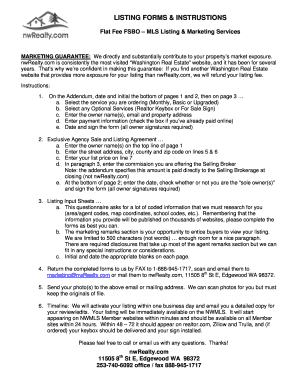
Filling out the residential forms online is a straightforward process designed to streamline your listing experience. This guide will walk you through each section of the form, ensuring that you provide all necessary information accurately and efficiently.
Follow the steps to complete your residential forms successfully.
- Press the ‘Get Form’ button to access the residential forms. This will open the necessary documentation in the online editor.
- Begin with the Addendum section. Date and initial the bottom of pages 1 and 2, then complete page 3 by selecting the service you are ordering (choose from Monthly, Basic, or Upgraded). You also have the option to select any additional services, such as a Realtor Keybox or For Sale sign.
- Enter the owner name(s), email, and property address in the required fields. It is crucial to ensure that this information is accurate and complete.
- Provide your payment information. If you previously paid online, check the corresponding box. Otherwise, you need to input your credit card details and sign the form, ensuring all owner signatures are collected.
- In the Exclusive Agency Sale and Listing Agreement section, enter the owner name(s) at the top of page 1. Fill in the street address, city, county, and zip code in the appropriate lines.
- State the listing price on line 7. In paragraph 3, indicate the commission you will offer the Selling Broker, keeping in mind that this amount is to be paid directly at closing.
- At the bottom of page 2, write the date, indicate whether you are the sole owner(s), and provide all necessary signatures.
- Complete the Listing Input Sheets by providing detailed information required for the listing. This section includes coded data that will be published broadly, so it should be filled out thoroughly.
- In the marketing remarks section, use your creativity to craft an enticing description for potential buyers. Remember to stay within the 500-character limit.
- Initial and date each page as required. Once you have completed all sections of the form, ensure that you return the documents to nwRealty through FAX, email, or mail.
- Send any photos to the designated email or mailing address, keeping in mind that original photos may need to be returned.
- Finally, once your submission is complete, you can save any changes, download copies for your records, print, or share the form as needed.
Start filling out your residential forms online today and ensure your property listing receives the attention it deserves.
You may be able to take these credits if you made energy saving improvements to your principal residence during the taxable year. In 2018, 2019 and 2020, the residential energy property credit is limited to an overall lifetime credit limit of $500 ($200 lifetime limit for windows).