We use cookies to improve security, personalize the user experience, enhance our marketing activities (including cooperating with our marketing partners) and for other business use.
Click "here" to read our Cookie Policy. By clicking "Accept" you agree to the use of cookies. Read less
Read more
Accept
Loading
Form preview
  • US Legal Forms
  • Form Library
  • More Forms
  • More Uncategorized Forms
  • Wv Credentialing Form

Get Wv Credentialing Form

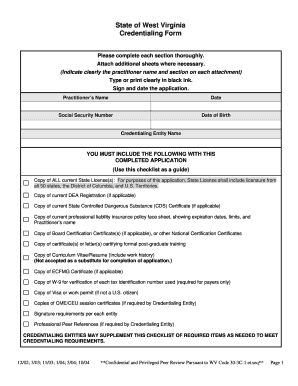
Professional Peer References (if required by Credentialing Entity). CREDENTIALING ENTITIES MAY SUPPLEMENT .

How it works

  1. Open form

    Open form follow the instructions

  2. Easily sign form

    Easily sign the form with your finger

  3. Share form

    Send filled & signed form or save

How to fill out the Wv Credentialing Form online

Completing the Wv Credentialing Form accurately is essential for any practitioner looking to maintain their medical licensure and credentials. This guide provides clear, step-by-step instructions to help you fill out the form online with confidence.

Follow the steps to successfully fill out the Wv Credentialing Form online.

  1. Click the ‘Get Form’ button to obtain the form and open it in your preferred editor.
  2. Begin filling out the 'Applicant Information' section. You will need to provide your last name, first name, middle name, and degree. Be sure to indicate your gender and date of birth, using 'N/A' for any fields that do not apply.
  3. Complete the 'Office Practice Information' section. Specify whether your office is a primary or additional site and provide details including address, telephone numbers, and the type of practice you are operating.
  4. In the 'Medical/Professional Education' section, list all educational institutions attended, along with the degrees received and dates of attendance. If you are an international graduate, make sure to attach your ECFMG Certificate.
  5. Move to the 'Professional Training' section. Document any internships, residencies, or fellowships completed, detailing the training institution, specialty, and whether the program was successfully completed.
  6. List all current and past professional licenses in the 'State License(s)' section. Indicate the status of each license and note any restrictions that may have been placed on them.
  7. Complete the 'Certifications/Registrations' section, providing details about any applicable certifications, including DEA registrations, and submit copies as required.
  8. Chat to the 'Professional Peer References' section. Provide names and contact details for at least three professional references who can validate your professional competencies.
  9. Fill out the sections regarding 'Hospital/Health Care Entity Affiliations' and 'Work History/Experience'. Ensure gaps greater than three months are addressed in the designated section.
  10. In the final sections, answer any liability and disclosure questions truthfully. After completing the form, ensure you sign and date it before submission.
  11. Once all information is accurately filled in, save your changes. You may download, print, or share the completed Wv Credentialing Form as required.

Complete your Wv Credentialing Form online today to streamline your credentialing process.

Get form

Experience a faster way to fill out and sign forms on the web. Access the most extensive library of templates available.
Get form

Related content

Uniform Credentialing Application Forms - West...
During 2001 and 2002, the Uniform Credentialing Advisory Committee developed the...
Learn more
Form WV/IT-104 - WV State Tax Department
WEST VIRGINIA EMPLOYEE'S WITHHOLDING EXEMPTION CERTIFICATE. FORM WV/IT-104. Complete this...
Learn more
Guide to Oregon Driving Records - State of Oregon
License/Credential types: ID with Primary = An ... Referral form, signed by representative...
Learn more

Related links form

Ny State Income Tax 2021-2024 Form - Fill Out And Sign ... MO MO-1120V 2023 NY IT-203 2023 Form ST-101 New York State And Local Annual Sales And Use Tax Return Revised 2/23

Questions & Answers

Get answers to your most pressing questions about US Legal Forms API.

Contact support

At the time of purchase, the code or serial number would be recorded along with the purchaser's information by a licensed dealer. Later, when a bullet or cartridge case is found at a crime scene, the bullet or spent cartridge could be quickly traced back to the purchaser.

“While the Second Amendment does not explicitly mention ammunition or magazines supplying ammunition, 'without bullets, the right to bear arms would be meaningless,'” Benitez wrote. “This is because the right to keep firearms for protection implies a corresponding right to obtain the bullets necessary to use them.”

A found bullet in decent shape can often be tied to a make and perhaps model of gun, since different manufacturers use different twists and numbers of lands and grooves. The only way a bullet can be traced to your particular gun is if the police are able to fire a test bullet from your gun, and then compare the two.

Petitioner shows that the public who ratified the Second Amendment understood that every type of firearm and ammunition available was protected by the guarantee, and that the Founders intended the People to have unfettered access to even military weapons, so the People would have equal footing in resistance to military ...

The powder was black powder, meaning low velocities so these early rifles shot large, heavy bullets which carried a long way. When it was realised that if a piece of paper was wound around the bullet it kept the lead bullet from touching the metal bore of the rifle, the paper patched bullet was born.

There are a number of methods which allow a bullet to be fired without the signature of the lands and groove. Paper patching is feasible but would not be as effective as other methods.

A paper patched bullet was and is used on lead cast bullets to act as a sort of jacket. served the same function as a metal jacket. It helped the bullet to engage the rifling without the bullet touching the rifling. This helped to prevent leading and allowed higher velocities.

Seven states regulate ammunition sellers. California, Massachusetts, New York, Washington State, and Washington, D.C., require a license to sell bullets, while New Jersey requires anyone selling bullets to have a permit to purchase or carry a handgun. California, New Jersey, and New York also require ammunition sellers ...

Get This Form Now!

Use professional pre-built templates to fill in and sign documents online faster. Get access to thousands of forms.
Get form
If you believe that this page should be taken down, please follow our DMCA take down processhere.

Industry-leading security and compliance

US Legal Forms protects your data by complying with industry-specific security standards.
  • In businnes since 1997
    25+ years providing professional legal documents.
  • Accredited business
    Guarantees that a business meets BBB accreditation standards in the US and Canada.
  • Secured by Braintree
    Validated Level 1 PCI DSS compliant payment gateway that accepts most major credit and debit card brands from across the globe.
Get Wv Credentialing Form
Get form
Form Packages
Adoption
Bankruptcy
Contractors
Divorce
Home Sales
Employment
Identity Theft
Incorporation
Landlord Tenant
Living Trust
Name Change
Personal Planning
Small Business
Wills & Estates
Packages A-Z
Form Categories
Affidavits
Bankruptcy
Bill of Sale
Corporate - LLC
Divorce
Employment
Identity Theft
Internet Technology
Landlord Tenant
Living Wills
Name Change
Power of Attorney
Real Estate
Small Estates
Wills
All Forms
Forms A-Z
Form Library
Customer Service
Terms of Service
Privacy Notice
Legal Hub
Content Takedown Policy
Bug Bounty Program
About Us
Help Portal
Legal Resources
Blog
Affiliates
Contact Us
Delete My Account
Site Map
Industries
Forms in Spanish
Localized Forms
State-specific Forms
Forms Kit
Legal Guides
Real Estate Handbook
All Guides
Prepared for You
Notarize
Incorporation services
Our Customers
For Consumers
For Small Business
For Attorneys
Our Sites
US Legal Forms
USLegal
FormsPass
pdfFiller
signNow
airSlate WorkFlow
DocHub
Instapage
Social Media
Call us now toll free:
+1 833 426 79 33
As seen in:
  • USA Today logo picture
  • CBC News logo picture
  • LA Times logo picture
  • The Washington Post logo picture
  • AP logo picture
  • Forbes logo picture
© Copyright 1997-2025
airSlate Legal Forms, Inc.
3720 Flowood Dr, Flowood, Mississippi 39232
Form Packages
Adoption
Bankruptcy
Contractors
Divorce
Home Sales
Employment
Identity Theft
Incorporation
Landlord Tenant
Living Trust
Name Change
Personal Planning
Small Business
Wills & Estates
Packages A-Z
Form Categories
Affidavits
Bankruptcy
Bill of Sale
Corporate - LLC
Divorce
Employment
Identity Theft
Internet Technology
Landlord Tenant
Living Wills
Name Change
Power of Attorney
Real Estate
Small Estates
Wills
All Forms
Forms A-Z
Form Library
Customer Service
Terms of Service
Privacy Notice
Legal Hub
Content Takedown Policy
Bug Bounty Program
About Us
Help Portal
Legal Resources
Blog
Affiliates
Contact Us
Delete My Account
Site Map
Industries
Forms in Spanish
Localized Forms
State-specific Forms
Forms Kit
Legal Guides
Real Estate Handbook
All Guides
Prepared for You
Notarize
Incorporation services
Our Customers
For Consumers
For Small Business
For Attorneys
Our Sites
US Legal Forms
USLegal
FormsPass
pdfFiller
signNow
airSlate WorkFlow
DocHub
Instapage
Social Media
Call us now toll free:
+1 833 426 79 33
As seen in:
  • USA Today logo picture
  • CBC News logo picture
  • LA Times logo picture
  • The Washington Post logo picture
  • AP logo picture
  • Forbes logo picture
© Copyright 1997-2025
airSlate Legal Forms, Inc.
3720 Flowood Dr, Flowood, Mississippi 39232