Loading
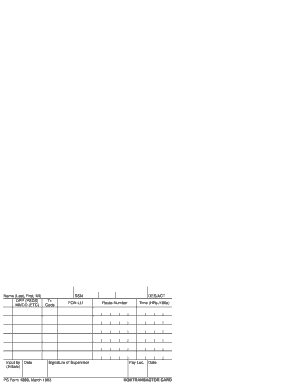
Get Ps Form 1260
How it works
-

Open form follow the instructions
-

Easily sign the form with your finger
-

Send filled & signed form or save
How to fill out the Ps Form 1260 online
The Ps Form 1260 is an essential document used for accurate timekeeping within postal services. This guide provides a step-by-step approach to filling out this form online, ensuring users have all the necessary information at their fingertips.
Follow the steps to complete the Ps Form 1260 effectively
- Click the ‘Get Form’ button to access the form and open it in your preferred editor.
- Begin by entering the name in the specified format: Last name, First name, Middle initial. Ensure accuracy as this will be used for identification.
- Next, locate the section labeled ‘DPP (PSDS)’, where you will fill in your details as required. Be sure to follow any specific guidelines provided.
- Proceed to the ‘Input by Date’ field. Enter the date when the form is being filled out, and include your initials in the provided space for verification.
- Complete the section for your Social Security Number (SSN). This information is confidential and should be entered with care.
- Fill in the ‘Tr. Code’ and other relevant fields as indicated. Ensure that the codes are accurate to maintain proper records.
- In the ‘FON-LU’ field, indicate the necessary information as it pertains to your situation.
- Add your supervisor's signature in the designated area, confirming the accuracy of your entries.
- Complete the section titled ‘Route Number.’ Specify your route to ensure correct documentation.
- Record the time worked in the ‘Time (HRs./100s)’ section. Utilize the time conversion table included to convert your hours into hundredths.
- Fill out the ‘Pay Location’ to designate the affected pay area accurately.
- Finally, review the entire form for accuracy. Save your changes, download the form, print it if necessary, or share it as required.
Complete your Ps Form 1260 online today to ensure accurate and timely processing of your records.
If you recently left your federal job, contact your former agency personnel office. If it's been more than 30 days since you left, you need to contact the Federal Records Center, http://.archives.gov/frc/. The FRC is the depository for official personnel folders of former federal service employees.