Loading
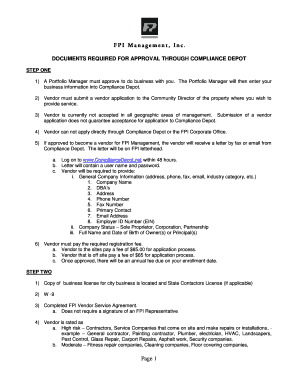
Get Hddownload3
How it works
-

Open form follow the instructions
-

Easily sign the form with your finger
-

Send filled & signed form or save
How to fill out the Hddownload3 online
Filling out the Hddownload3 online can streamline your application process and ensure compliance with necessary requirements. This guide provides clear, step-by-step instructions to aid users in accurately completing the form.
Follow the steps to effectively complete the Hddownload3 online application.
- Click the ‘Get Form’ button to access the Hddownload3 form and open it in your preferred editor.
- Begin filling out the General Company Information section. Provide your company name, DBA (Doing Business As) names, address, phone number, fax number, primary contact, email address, and Employer ID Number (EIN). Ensure all details are accurate and complete.
- Indicate your Company Status by selecting whether you are a sole proprietor, corporation, or partnership. This will guide the vetting and approval process.
- Enter the full name and date of birth of all owners or principals. This information is crucial for identity verification during the application process.
- Submit the required vendor application fee. If you are submitting on-site, ensure to remit the fee of $85.00; for off-site applications, the fee is $65.00.
- Gather and upload the necessary documentation, including a business license for the city in which your business operates and, if applicable, a State Contractors License.
- Complete and submit a W-9 form along with the FPI Vendor Service Agreement, which does not require an FPI representative's signature.
- Ensure you have the required insurance documentation. This includes proof of Workman’s Compensation coverage and liability insurance, with Compliance Depot named as the Certificate Holder.
- Avoid submitting incorrect or incomplete documentation, as this can delay the approval process significantly.
- Once all fields are filled out accurately and required documents have been attached, review your application for any errors.
- Finally, save your changes, download a copy of your completed application, and share it if necessary.
Start your application by filling out the Hddownload3 online today!
To replace the mutilated notes that came out of the ATM, you have to go to the bank from whose ATM the notes came out. You will have to write an application after going there in which you will have to write the information about the date, time, and place from where the money was withdrawn.
Industry-leading security and compliance
US Legal Forms protects your data by complying with industry-specific security standards.
-
In businnes since 199725+ years providing professional legal documents.
-
Accredited businessGuarantees that a business meets BBB accreditation standards in the US and Canada.
-
Secured by BraintreeValidated Level 1 PCI DSS compliant payment gateway that accepts most major credit and debit card brands from across the globe.