Loading
Get Medlife Modot
How it works
-

Open form follow the instructions
-

Easily sign the form with your finger
-

Send filled & signed form or save
How to fill out the Medlife Modot online
Filling out the Medlife Modot form online can streamline your access to essential information. This guide provides clear, step-by-step instructions to ensure you complete the process smoothly.
Follow the steps to complete the Medlife Modot form online.
- Click the ‘Get Form’ button to obtain the Medlife Modot form and open it in your preferred editor.
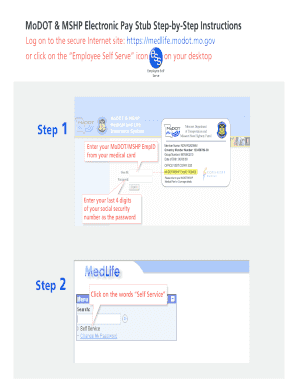
- Enter your MoDOT/MSHP Employee ID found on your medical card. This ID is crucial for accessing your records.
- Input your last four digits of your social security number as the password to log into the system.
- Select the options under the ‘Self Service’ section to access pay stub information.
- Click on ‘View Pay Check’ to see your most recent pay stub. For a printable version, choose the 'Print Friendly Version' option.
- If you wish to view a different paycheck, click on the designated link and make your selection.
- Once you have finished reviewing your pay stubs, be sure to ‘Sign Out’ to secure your information.
Complete your documents online for efficient access and management.
State of Missouri: Department of Revenue (573) 751-4450. Automated Tax Credit Status. (573) 526-8299. Property Tax Credit Claim. (573) 751-3505.
Industry-leading security and compliance
US Legal Forms protects your data by complying with industry-specific security standards.
-
In businnes since 199725+ years providing professional legal documents.
-
Accredited businessGuarantees that a business meets BBB accreditation standards in the US and Canada.
-
Secured by BraintreeValidated Level 1 PCI DSS compliant payment gateway that accepts most major credit and debit card brands from across the globe.