Loading
Get Tc 40w Form
How it works
-

Open form follow the instructions
-

Easily sign the form with your finger
-

Send filled & signed form or save
How to fill out the Tc 40w Form online
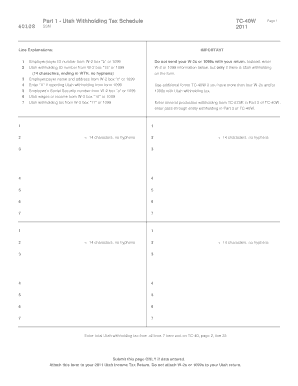
The Tc 40w form is essential for reporting Utah withholding tax from W-2s and 1099s. This guide provides clear, step-by-step instructions to help users complete the form online with confidence.
Follow the steps to successfully complete the Tc 40w Form online.
- Press the ‘Get Form’ button to access the Tc 40w Form and open it in your preferred editing tool.
- Enter the employer/payer ID number from box 'b' of the W-2 or 1099 in the designated field.
- Input the Utah withholding ID number found in box '15' of the W-2 or on the 1099 form. Ensure it consists of 14 characters and ends with WTH, omitting any hyphens.
- Provide the employer/payer name and address as listed in box 'c' of the W-2 or 1099.
- If reporting Utah withholding from a 1099, mark the checkbox accordingly.
- Fill in the employee's Social Security number from box 'a' of the W-2 or 1099.
- Enter the Utah wages or income as stated in box '16' of the W-2 or the appropriate field in the 1099.
- Complete the Utah withholding tax amount from box '17' of the W-2 or 1099.
- If necessary, use additional TC-40W forms for reporting more than four W-2s or 1099s with Utah withholding tax.
- For mineral production withholding, enter the relevant data in Part 2 from TC-675R.
- For pass-through entity withholding, complete Part 3 with appropriate details from Utah Schedule K-1.
- Once all information is accurately entered, save any changes made to the form. Users can then download, print, or share their completed form as needed.
Complete your Tc 40w Form online today to ensure accurate reporting of your Utah withholding tax.
Have New Employees Complete a Federal Tax Form Unlike many other states, Utah does not have a separate state equivalent to Form W-4, but instead relies on the federal form. You can download blank Forms W-4 from irs.gov. Clearly label W-4s used for state tax withholding as your state withholding form.