Loading
Form preview
  • US Legal Forms
  • Form Library
  • More Forms
  • More Uncategorized Forms
  • Sett Framework Grid 1102 Sett Framework Grid 1102

Get Sett Framework Grid 1102 Sett Framework Grid 1102

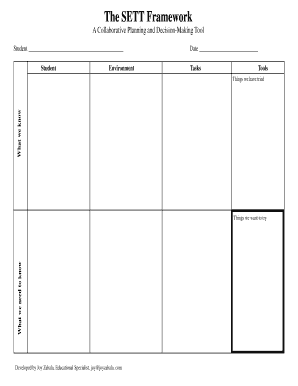
The SETT Framework A Collaborative Planning and DecisionMaking Tool Student Student Environment Date Tasks Tools What we know Things we have tried What we need to know Things we want to try Developed.

How it works

  1. Open form

    Open form follow the instructions

  2. Easily sign form

    Easily sign the form with your finger

  3. Share form

    Send filled & signed form or save

How to fill out the SETT Framework Grid 1102 online

The SETT Framework Grid 1102 is a collaborative planning and decision-making tool that supports users in effectively assessing student needs and environmental factors. This guide will walk you through the step-by-step process to fill out the form online, ensuring clarity and accuracy.

Follow the steps to complete the SETT Framework Grid 1102

  1. Press the ‘Get Form’ button to access the form and open it in your preferred editor.
  2. Begin by completing the 'Student' section. Enter the name of the student in the provided space to identify who the assessment focuses on.
  3. In the 'Environment' section, describe the various environments in which the student engages, including home, school, and community, to provide context on their situational factors.
  4. Fill in the 'Date' field with the current date to mark when the assessment is being completed.
  5. Under 'Tasks', list the specific tasks or activities that the student will be involved in. This will help clarify the focus areas for support.
  6. In the 'Tools' section, identify any tools or resources that may assist the student in completing the outlined tasks effectively.
  7. Utilize the 'What we know' section to summarize existing knowledge about the student, their strengths, and any previous assessments.
  8. Document 'Things we have tried.' Note any strategies or interventions previously implemented to support the student’s learning.
  9. In 'What we need to know', list the information that remains unclear or needs further exploration to effectively support the student.
  10. Finally, in 'Things we want to try', describe potential new strategies or interventions you wish to explore for the student.
  11. Once all sections are completed, you can choose to save your changes, download the filled form, print it, or share it as necessary.

Start filling out the SETT Framework Grid 1102 online to better support student planning and decision-making.

Get form

Experience a faster way to fill out and sign forms on the web. Access the most extensive library of templates available.
Get form

Related content

pluvius - OSTI.gov
possess a generalized code which would provide a flexible framework for ... tational grid...
Learn more
Resume - Boris Jeremic - UC Davis
Dec 16, 2020 — Boris Jeremic. Time Domain Intrusive Stochastic Framework for Seismic...
Learn more
RM-411 GSM 900/ 1800/ 1900 Cellphone W/BT User...
To change the menu view, select Options > Main menu view > List, Grid, Grid with...
Learn more

Related links form

Caregiving From A Distance In Audit & Information Daily Developments Helping Babies Get Off To A Healthy Start Meet ... FAQs: Health Care Reform And COBRA - US Department Of Labor

Get This Form Now!

Use professional pre-built templates to fill in and sign documents online faster. Get access to thousands of forms.
Get form
If you believe that this page should be taken down, please follow our DMCA take down processhere.
Get SETT Framework Grid 1102 SETT Framework Grid 1102
Get form
  • Adoption
  • Bankruptcy
  • Contractors
  • Divorce
  • Home Sales
  • Employment
  • Identity Theft
  • Incorporation
  • Landlord Tenant
  • Living Trust
  • Name Change
  • Personal Planning
  • Small Business
  • Wills & Estates
  • Packages A-Z
  • Affidavits
  • Bankruptcy
  • Bill of Sale
  • Corporate - LLC
  • Divorce
  • Employment
  • Identity Theft
  • Internet Technology
  • Landlord Tenant
  • Living Wills
  • Name Change
  • Power of Attorney
  • Real Estate
  • Small Estates
  • Wills
  • All Forms
  • Forms A-Z
  • Form Library
  • Legal Hub
  • About Us
  • Help Portal
  • Legal Resources
  • Blog
  • Affiliates
  • Contact Us
  • Delete My Account
  • Site Map
  • Industries
  • Forms in Spanish
  • Localized Forms
  • State-specific Forms
  • Forms Kit
  • Real Estate Handbook
  • All Guides
  • Notarize
  • Incorporation services
  • For Consumers
  • For Small Business
  • For Attorneys
  • USLegal
  • FormsPass
  • pdfFiller
  • signNow
  • altaFlow
  • DocHub
  • Instapage
Form Packages
  • Adoption
  • Bankruptcy
  • Contractors
  • Divorce
  • Home Sales
  • Employment
  • Identity Theft
  • Incorporation
  • Landlord Tenant
  • Living Trust
  • Name Change
  • Personal Planning
  • Small Business
  • Wills & Estates
  • Packages A-Z
Form Categories
  • Affidavits
  • Bankruptcy
  • Bill of Sale
  • Corporate - LLC
  • Divorce
  • Employment
  • Identity Theft
  • Internet Technology
  • Landlord Tenant
  • Living Wills
  • Name Change
  • Power of Attorney
  • Real Estate
  • Small Estates
  • Wills
  • All Forms
  • Forms A-Z
  • Form Library
Customer Service
  • Legal Hub
  • About Us
  • Help Portal
  • Legal Resources
  • Blog
  • Affiliates
  • Contact Us
  • Delete My Account
  • Site Map
  • Industries
  • Forms in Spanish
  • Localized Forms
  • State-specific Forms
  • Forms Kit
Legal Guides
  • Real Estate Handbook
  • All Guides
Prepared for you
  • Notarize
  • Incorporation services
Our Customers
  • For Consumers
  • For Small Business
  • For Attorneys
Our Sites
  • USLegal
  • FormsPass
  • pdfFiller
  • signNow
  • altaFlow
  • DocHub
  • Instapage
Social Media
Call us now toll free:
+1 833 426 79 33
As seen in:
© Copyright 1999-2026 airSlate Legal Forms, Inc. 3720 Flowood Dr, Flowood, Mississippi 39232
  • Your Privacy Choices
  • Terms of Service
  • Privacy Notice
  • Content Takedown Policy
  • Bug Bounty Program