Loading
Get Dar Member Grave Marker Report Bformb - Dar
How it works
-

Open form follow the instructions
-

Easily sign the form with your finger
-

Send filled & signed form or save
How to fill out the DAR MEMBER GRAVE MARKER REPORT BFORMb - Dar online
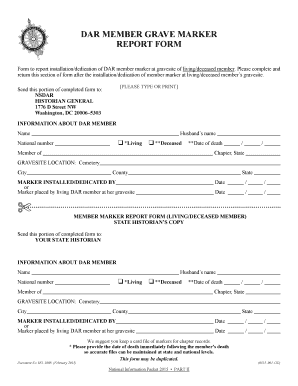
Filling out the DAR Member Grave Marker Report BFORMb online is straightforward and crucial for ensuring proper documentation of the installation or dedication of grave markers for members. This guide provides a step-by-step approach to this process.
Follow the steps to accurately complete the form.
- Click ‘Get Form’ button to obtain the form and open it in the editor.
- Begin by providing the information about the DAR member. Enter the member's name, national number, and spouse's name if applicable. Select whether the member is living or deceased by checking the appropriate box.
- If the member is deceased, fill in the date of death in the specified format. Indicate the member's chapter and state of affiliation.
- Next, input the grave site location details. Include the cemetery name, city, county, and state where the grave marker is located.
- Document the installation or dedication details. Specify who installed or dedicated the marker, and provide the date of this event.
- Once all fields are completed, review the information for accuracy. Ensure all necessary details are captured to maintain accurate records.
- Finally, save your changes, and choose to download, print, or share the completed form as needed. Ensure to send the required sections to the designated authorities as instructed.
Complete your documentation promptly by filling out related forms online.
In law, an attestation is a declaration by a witness that a legal document was properly signed in the presence of the witness. Essentially, it confirms that a document is valid. A notary public provides an attestation for documents.