Loading
Get Parental Consent Form From Lions Club To Test Vision - Rvschools
How it works
-

Open form follow the instructions
-

Easily sign the form with your finger
-

Send filled & signed form or save
How to fill out the parental consent form from Lions Club to test vision - Rvschools online
Completing the parental consent form from Lions Club for your child's vision screening is crucial to ensure their health and well-being. This guide will walk you through each section of the form to facilitate a smooth and efficient completion process.
Follow the steps to effectively fill out the consent form.
- Click the ‘Get Form’ button to obtain the form and open it in your preferred editor.
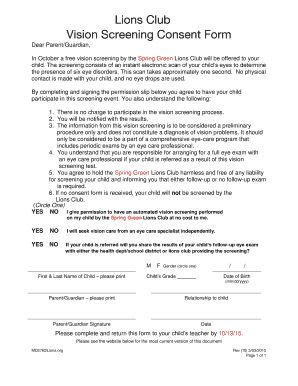
- Read the introduction thoroughly. It outlines the purpose of the vision screening and provides important information about the process, including the absence of charges, the nature of the screening, and your responsibilities.
- Locate the consent section where you will need to circle 'YES' or 'NO' to grant permission for the automated vision screening. Make your selection carefully.
- Inquire about seeking vision care independently by circling 'YES' or 'NO' based on your plans.
- Answer whether you will share the results of any follow-up eye exams with the health department, school district, or Lions Club. Make your choice by circling 'YES' or 'NO'.
- Fill in the details of your child, including their first and last name, gender, grade, and date of birth in the designated fields.
- Enter your name as the parent or guardian, and specify your relationship to the child in the respective fields.
- Sign and date the form, confirming your consent and understanding of the necessary information provided.
- Review the completed form for accuracy, ensuring all required fields are filled out correctly.
- Save your changes, download the form, or print it out to return to your child’s teacher by the specified deadline of 10/13/15.
Complete the parental consent form online today for your child's vision screening!
Related links form
The most common resolutions for faxing and corresponding 'best' scanner setting are: Hyperfine - 408x391 - Scanner at 400 dpi. Fine - 204x196 - Scanner at 200 dpi. Normal/Low - 204x98 - Scanner at 200 dpi.
Industry-leading security and compliance
US Legal Forms protects your data by complying with industry-specific security standards.
-
In businnes since 199725+ years providing professional legal documents.
-
Accredited businessGuarantees that a business meets BBB accreditation standards in the US and Canada.
-
Secured by BraintreeValidated Level 1 PCI DSS compliant payment gateway that accepts most major credit and debit card brands from across the globe.