Loading
Get Small Procurement Documents For Construction Related Professional Services Rfp, Proposal &amp
How it works
-

Open form follow the instructions
-

Easily sign the form with your finger
-

Send filled & signed form or save
How to fill out the SMALL PROCUREMENT DOCUMENTS for Construction Related Professional Services RFP, Proposal & Award online
This guide aims to provide clear and systematic instructions for filling out the SMALL PROCUREMENT DOCUMENTS for Construction Related Professional Services RFP, Proposal & Award. Designed for ease of use, this comprehensive overview covers each section of the form, ensuring all users can navigate through the process confidently.
Follow the steps to successfully complete your procurement documents.
- Click ‘Get Form’ button to obtain the form and open it in the online editor.
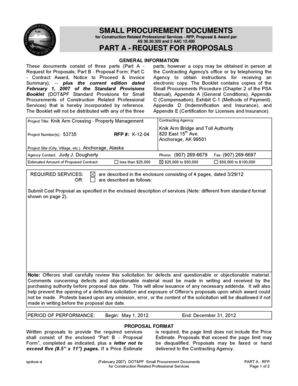
- Enter the Project Title at the top of the proposal form, as specified in the RFP. This will help identify the project you are bidding for.
- Fill in the RFP number, which is provided in the documents. This will help in tracking and processing your proposal.
- Provide the contact information for the contracting agency, including the phone number and fax number. Make sure to double-check for accuracy.
- Outline the required services, referring to the enclosure that describes what is needed for the project, ensuring that each area outlined is addressed in your proposal.
- Detail the proposal format, being mindful of the specified page limit. Include all required information, ensuring your proposal is concise and meets all conditions.
- Complete the Price Estimate Format if required. Provide details on direct costs, indirect costs, and any subcontracts. Ensure to follow the specific table format provided in the guidelines.
- Review the submission deadline and location, ensuring you meet the deadline for submitting your proposal. Late submissions may not be accepted.
- Sign and date your proposal, ensuring that you provide all required certifications and information as requested in the form.
- Once everything is filled out, you can save changes, download the completed form, print, or share the proposal online as necessary.
Start completing your SMALL PROCUREMENT DOCUMENTS online today to ensure a timely submission.
How to Create a Procurement Plan Describe the Procurement Process. ... Outline Roles and Responsibilities. ... Determine Needs and Requirements. ... Define a Project Timeline. ... Determine Project Constraints. ... Define Vendor Selection Criteria. ... Select a Contract Type. ... Determine Payment Terms and Methods.
Industry-leading security and compliance
US Legal Forms protects your data by complying with industry-specific security standards.
-
In businnes since 199725+ years providing professional legal documents.
-
Accredited businessGuarantees that a business meets BBB accreditation standards in the US and Canada.
-
Secured by BraintreeValidated Level 1 PCI DSS compliant payment gateway that accepts most major credit and debit card brands from across the globe.