We use cookies to improve security, personalize the user experience, enhance our marketing activities (including cooperating with our marketing partners) and for other business use.
Click "here" to read our Cookie Policy. By clicking "Accept" you agree to the use of cookies. Read less
Read more
Accept
Loading
Form preview
  • US Legal Forms
  • Form Library
  • More Forms
  • More Uncategorized Forms
  • Ctillerbook - Gearmore Inc

Get Ctillerbook - Gearmore Inc

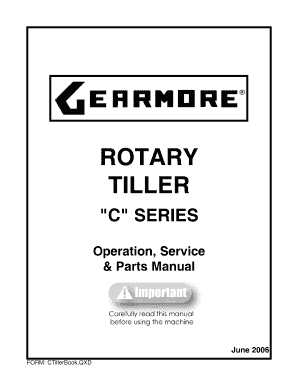
ROTARY TILLER "C " SERIES Operation, Service & Parts Manual June 2006 FORM: CTillerBook.QXD No part of this manual shall be reproduced, copied or disseminated by any means, without Gearmore.

How it works

  1. Open form

    Open form follow the instructions

  2. Easily sign form

    Easily sign the form with your finger

  3. Share form

    Send filled & signed form or save

How to fill out the CTillerBook - Gearmore Inc online

Filling out the CTillerBook - Gearmore Inc online is essential for maintaining your rotary tiller and ensuring optimal performance. This guide provides clear and concise instructions on how to complete the necessary fields in the form.

Follow the steps to effectively complete the form.

  1. Click ‘Get Form’ button to obtain the form and open it in the appropriate online interface.
  2. Enter the date of purchase in the designated field to specify when you acquired your tiller.
  3. Fill in the model number of your tiller as indicated on the identification plate.
  4. Input the serial number of your tiller, which can also be found on the identification plate, ensuring accurate maintenance records.
  5. Review the terms and warranty information provided in the form to understand your rights and obligations.
  6. Once all relevant data is recorded, ensure that all information is correct and complete.
  7. Save any changes made to the form, and proceed to download, print, or share the completed document as needed.

Complete your documents online to ensure a smooth maintenance process for your Gearmore tiller.

Get form

Experience a faster way to fill out and sign forms on the web. Access the most extensive library of templates available.
Get form

Related links form

Chapter 100 Secrecy, Access, National Security, And Foreign Filing - Uspto 92024565 - U.S. Patent And Trademark Office - Uspto In Re Who? Vision Systems, Inc. - U.S. Patent And Trademark Office - Uspto Disclosure Doc 11/2/00 - U.S. Patent And Trademark Office - Uspto

Questions & Answers

Get answers to your most pressing questions about US Legal Forms API.

Contact support

Foxit's free PDF Reader is the most powerful in the industry. Our small, feature-rich, and very fast PDF Reader enables you to view, annotate, fill out, or securely sign PDF documents no matter where you are or what device you're on. No other PDF Reader is as intuitive and quick to use.

How to redact a PDF in 7 steps. Select Tools › Redact. Use the crosshair to draw rectangles over the text or images you want to permanently remove from the PDF. ... Optional: If you don't want a black box, select your preferred redaction marks. ... Click Apply.

Instead, use Foxit PDF Editor Pro which contains "Whiteout" and "Redaction" these two true redaction features. These tools let you permanently remove (redact) visible text and images from PDF documents to protect confidential information such as social security numbers or witness photos.

Select the "Redact" tool from the toolbar: To use the redact PDF tool, first select it from the toolbar in WPS Office. Choose the area to be redacted: Click and drag the cursor over the area you want to redact. The redaction tool will replace the selected area with a black box.

Edit Text Click Edit in the Common Tools toolbar to open the Edit toolbar. Select Edit Text in the Edit toolbar. Click on the desired paragraph to start editing. You can select the text and change its formats in the Format.

How to black out text in a PDF file Open your PDF in Adobe's Acrobat online services. Select Tools, then Redact. Select text. Either double-click to select the text or drag to select lines of text. Apply redaction. Once you've selected the text you want to remove, click Save to apply the changes and save the document.

Apply Redaction Select Protect > Mark for Redaction > Apply Redactions to redact all of the marked content in the document. ... A dialog box pops up to give a warning message and asks if you are sure to apply the redaction or not. Select OK after you have marked all content that you want to redact.

Open the PDF in Acrobat, and then do one of the following: Choose Tools > Redact. On the Edit menu, choose Redact Text & Images. Select the text or image in a PDF, right-click, and select Redact. Select the text or image in a PDF, choose Redact in the floating context-menu.

Get This Form Now!

Use professional pre-built templates to fill in and sign documents online faster. Get access to thousands of forms.
Get form
If you believe that this page should be taken down, please follow our DMCA take down processhere.

Industry-leading security and compliance

US Legal Forms protects your data by complying with industry-specific security standards.
  • In businnes since 1997
    25+ years providing professional legal documents.
  • Accredited business
    Guarantees that a business meets BBB accreditation standards in the US and Canada.
  • Secured by Braintree
    Validated Level 1 PCI DSS compliant payment gateway that accepts most major credit and debit card brands from across the globe.
Get CTillerBook - Gearmore Inc
Get form
Form Packages
Adoption
Bankruptcy
Contractors
Divorce
Home Sales
Employment
Identity Theft
Incorporation
Landlord Tenant
Living Trust
Name Change
Personal Planning
Small Business
Wills & Estates
Packages A-Z
Form Categories
Affidavits
Bankruptcy
Bill of Sale
Corporate - LLC
Divorce
Employment
Identity Theft
Internet Technology
Landlord Tenant
Living Wills
Name Change
Power of Attorney
Real Estate
Small Estates
Wills
All Forms
Forms A-Z
Form Library
Customer Service
Terms of Service
Privacy Notice
Legal Hub
Content Takedown Policy
Bug Bounty Program
About Us
Blog
Affiliates
Contact Us
Delete My Account
Site Map
Industries
Forms in Spanish
Localized Forms
State-specific Forms
Forms Kit
Legal Guides
Real Estate Handbook
All Guides
Prepared for You
Notarize
Incorporation services
Our Customers
For Consumers
For Small Business
For Attorneys
Our Sites
US Legal Forms
USLegal
FormsPass
pdfFiller
signNow
airSlate WorkFlow
DocHub
Instapage
Social Media
Call us now toll free:
+1 833 426 79 33
As seen in:
  • USA Today logo picture
  • CBC News logo picture
  • LA Times logo picture
  • The Washington Post logo picture
  • AP logo picture
  • Forbes logo picture
© Copyright 1997-2025
airSlate Legal Forms, Inc.
3720 Flowood Dr, Flowood, Mississippi 39232
Form Packages
Adoption
Bankruptcy
Contractors
Divorce
Home Sales
Employment
Identity Theft
Incorporation
Landlord Tenant
Living Trust
Name Change
Personal Planning
Small Business
Wills & Estates
Packages A-Z
Form Categories
Affidavits
Bankruptcy
Bill of Sale
Corporate - LLC
Divorce
Employment
Identity Theft
Internet Technology
Landlord Tenant
Living Wills
Name Change
Power of Attorney
Real Estate
Small Estates
Wills
All Forms
Forms A-Z
Form Library
Customer Service
Terms of Service
Privacy Notice
Legal Hub
Content Takedown Policy
Bug Bounty Program
About Us
Blog
Affiliates
Contact Us
Delete My Account
Site Map
Industries
Forms in Spanish
Localized Forms
State-specific Forms
Forms Kit
Legal Guides
Real Estate Handbook
All Guides
Prepared for You
Notarize
Incorporation services
Our Customers
For Consumers
For Small Business
For Attorneys
Our Sites
US Legal Forms
USLegal
FormsPass
pdfFiller
signNow
airSlate WorkFlow
DocHub
Instapage
Social Media
Call us now toll free:
+1 833 426 79 33
As seen in:
  • USA Today logo picture
  • CBC News logo picture
  • LA Times logo picture
  • The Washington Post logo picture
  • AP logo picture
  • Forbes logo picture
© Copyright 1997-2025
airSlate Legal Forms, Inc.
3720 Flowood Dr, Flowood, Mississippi 39232