Loading
Form preview
  • US Legal Forms
  • Form Library
  • More Forms
  • More Uncategorized Forms
  • Kwl Chart - Bbkingmuseum

Get Kwl Chart - Bbkingmuseum

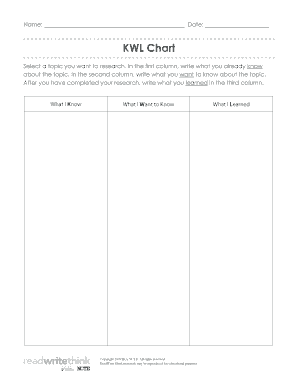
Name: Date: KWL Chart Select a topic you want to research. In the first column, write what you already know about the topic. In the second column, write what you want to know about the topic. After.

How it works

  1. Open form

    Open form follow the instructions

  2. Easily sign form

    Easily sign the form with your finger

  3. Share form

    Send filled & signed form or save

How to fill out the KWL Chart - Bbkingmuseum online

The KWL chart is an effective tool for organizing research by categorizing what you Know, what you Want to know, and what you Learned. This guide will provide you with clear, step-by-step instructions to help you successfully complete the KWL Chart - Bbkingmuseum online.

Follow the steps to fill out the KWL Chart efficiently.

  1. Click ‘Get Form’ button to access the KWL Chart form and open it in your online editor.
  2. In the first column labeled 'What I Know', enter any information, facts, or insights you currently have about the chosen topic. This section helps to establish your existing knowledge base.
  3. Move to the second column titled 'What I Want to Know'. Here, list specific questions or topics you are curious about regarding your chosen subject. This will guide your research focus.
  4. After completing your research, proceed to the third column marked 'What I Learned'. Summarize the key findings and insights you gained from your research in this section.
  5. Once all sections are filled, you can save your changes to the document. Additionally, consider downloading, printing, or sharing the completed form as needed.

Start filling out the KWL Chart online today to enhance your research skills!

Get form

Experience a faster way to fill out and sign forms on the web. Access the most extensive library of templates available.
Get form

Related content

DOCUMENT RESUME ED 345 224 CS 010 948 ... - ERIC
Items 11 - 213 — Complete the form as soon after your first pre- ... [Refer to the...
Learn more
Hawaii's Coral Reef Ecosystem Curriculum
Lesson 1.2: Background article and KWL chart (1 per student). Lesson 1.3: Coral...
Learn more

Related links form

Acquia GDPR Data Processing Addendum 2021 IL Jewish Agency For Israel Waiver Of Confidentiality For Candidate For Aliyah/Return To Israel/Olim 2014 FI Maahanmuuttovirasto PK2 2018 KY KBA Form 1 2017

Questions & Answers

Get answers to your most pressing questions about US Legal Forms API.

Contact support

Click and drag your cursor across the text you want to redact to do so. drop-down arrow to the right of the ab highlighter bar, which is in the "Font" section of the Home tab. A drop-down menu with different colored boxes will appear. Click the black box.

Redaction Steps Activate the tool by clicking on the Redaction Tool button on the Document Tab or using the shortcut key Ctrl + Shift + Y (⌘ + Shift + Y on Mac). Begin marking the content that you wish to be redacted.

Cut out the text that needs to be redacted. Use scissors to cut out all the text you need to redact. Make sure you find every mention of the sensitive information in the paper document and cut it out. NOTE: You should then shred the paper clippings to ensure the cut-out information cannot be traced or found.

As per HIPAA Privacy Rule, there are 18 identifiers of PHI: Name. Address. All elements of dates, including birthdates, admission and discharge dates, date of death etc. Telephone numbers. Email addresses. Fax numbers. Social Security numbers. Medical record numbers.

Sanitize your documents. Choose Tools › Redact. Click Sanitize Document in the top toolbar. Choose to selectively remove hidden information or remove all by clicking OK. Choose Save As… and save the file with a different name to avoid overwriting the original.

Best practices for redacting a PDF Make a copy of the original PDF. Use a different color or font for the redacted text to stand out from the rest of the document. Use a highlighter or other marking tool to identify the confidential data you want to remove. Redact the data using a PDF editing program.

Choose Tools > Redact. On the Edit menu, choose Redact Text & Images. Select the text or image in a PDF, right-click, and select Redact.

(2) The following information must be redacted from records to which the court allows remote access under (d): driver's license numbers; dates of birth; social security numbers; Criminal Identification and Information and National Crime Information numbers; addresses, e-mail addresses, and phone numbers of parties, ...

What information should be redacted? Social Security Numbers (SSNs) Driver's License Numbers (DL) Date of Birth (DOB) Medical Record Numbers (MRN) Account Numbers. Addresses. Phone Numbers.

Redaction Defined Redaction is the task of rendering passages in a document illegible because those passages are confidential or otherwise exempt from disclosure. The process to redact passages from a printed document is to obscure the text or images with a dark permanent marker.

Get This Form Now!

Use professional pre-built templates to fill in and sign documents online faster. Get access to thousands of forms.
Get form
If you believe that this page should be taken down, please follow our DMCA take down processhere.

Industry-leading security and compliance

US Legal Forms protects your data by complying with industry-specific security standards.
  • In businnes since 1997
    25+ years providing professional legal documents.
  • Accredited business
    Guarantees that a business meets BBB accreditation standards in the US and Canada.
  • Secured by Braintree
    Validated Level 1 PCI DSS compliant payment gateway that accepts most major credit and debit card brands from across the globe.
Get KWL Chart - Bbkingmuseum
Get form
  • Adoption
  • Bankruptcy
  • Contractors
  • Divorce
  • Home Sales
  • Employment
  • Identity Theft
  • Incorporation
  • Landlord Tenant
  • Living Trust
  • Name Change
  • Personal Planning
  • Small Business
  • Wills & Estates
  • Packages A-Z
  • Affidavits
  • Bankruptcy
  • Bill of Sale
  • Corporate - LLC
  • Divorce
  • Employment
  • Identity Theft
  • Internet Technology
  • Landlord Tenant
  • Living Wills
  • Name Change
  • Power of Attorney
  • Real Estate
  • Small Estates
  • Wills
  • All Forms
  • Forms A-Z
  • Form Library
  • Legal Hub
  • About Us
  • Help Portal
  • Legal Resources
  • Blog
  • Affiliates
  • Contact Us
  • Delete My Account
  • Site Map
  • Industries
  • Forms in Spanish
  • Localized Forms
  • State-specific Forms
  • Forms Kit
  • Real Estate Handbook
  • All Guides
  • Notarize
  • Incorporation services
  • For Consumers
  • For Small Business
  • For Attorneys
  • USLegal
  • FormsPass
  • pdfFiller
  • signNow
  • altaFlow
  • DocHub
  • Instapage
Form Packages
  • Adoption
  • Bankruptcy
  • Contractors
  • Divorce
  • Home Sales
  • Employment
  • Identity Theft
  • Incorporation
  • Landlord Tenant
  • Living Trust
  • Name Change
  • Personal Planning
  • Small Business
  • Wills & Estates
  • Packages A-Z
Form Categories
  • Affidavits
  • Bankruptcy
  • Bill of Sale
  • Corporate - LLC
  • Divorce
  • Employment
  • Identity Theft
  • Internet Technology
  • Landlord Tenant
  • Living Wills
  • Name Change
  • Power of Attorney
  • Real Estate
  • Small Estates
  • Wills
  • All Forms
  • Forms A-Z
  • Form Library
Customer Service
  • Legal Hub
  • About Us
  • Help Portal
  • Legal Resources
  • Blog
  • Affiliates
  • Contact Us
  • Delete My Account
  • Site Map
  • Industries
  • Forms in Spanish
  • Localized Forms
  • State-specific Forms
  • Forms Kit
Legal Guides
  • Real Estate Handbook
  • All Guides
Prepared for you
  • Notarize
  • Incorporation services
Our Customers
  • For Consumers
  • For Small Business
  • For Attorneys
Our Sites
  • USLegal
  • FormsPass
  • pdfFiller
  • signNow
  • altaFlow
  • DocHub
  • Instapage
Social Media
Call us now toll free:
+1 833 426 79 33
As seen in:
© Copyright 1999-2026 airSlate Legal Forms, Inc. 3720 Flowood Dr, Flowood, Mississippi 39232
  • Your Privacy Choices
  • Terms of Service
  • Privacy Notice
  • Content Takedown Policy
  • Bug Bounty Program