Loading
Get Codicil Template
How it works
-

Open form follow the instructions
-

Easily sign the form with your finger
-

Send filled & signed form or save
How to fill out the Codicil Template online
The Codicil Template is an essential legal document used to amend or update an existing will. This guide will help you understand how to complete the Codicil Template online, ensuring that your intentions are clearly communicated.
Follow the steps to properly fill out your Codicil Template.
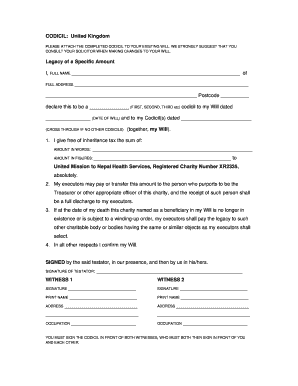
- Press the ‘Get Form’ button to obtain the Codicil Template and open it in your preferred online editor.
- Begin filling in your full name in the designated space for 'FULL NAME' and your complete address in the 'FULL ADDRESS' section, including the postcode.
- Indicate the order of this Codicil, such as 'first', 'second', or 'third', in the section labeled 'declare this to be a ______________ (FIRST, SECOND, THIRD etc) codicil to my Will dated'.
- Input the date of your existing will in the space provided next to 'dated'. If you have previous Codicils, enter their dates accordingly or cross through the section if none exist.
- In the section titled 'I give free of inheritance tax the sum of', write out the amount you wish to be granted in words under 'AMOUNT IN WORDS' and repeat the numerical value in 'AMOUNT IN FIGURES'.
- Confirm the recipient of the funds by specifying 'United Mission to Nepal Health Services, Registered Charity Number XR2335'.
- Make sure to review the instructions for your executors regarding how to handle the legacy in the subsequent sections, ensuring you are comfortable with these terms.
- In the area for signatures, prepare to sign the document as the testator, ensuring that your signature is placed above the designated area.
- Arrange for two witnesses to be present. Both witnesses will sign underneath the sections labeled 'WITNESS 1' and 'WITNESS 2', after you have signed in their presence.
- Once all signatures are in place, double-check that all fields are completed accurately. You may then save your changes, download the completed document, print it for your records, or share it as necessary.
Complete your Codicil Template online today for peace of mind regarding your estate.
How do I write a Codicil? You can handwrite or type a Codicil. It should state at the top it is a codicil, and make reference to the document it is altering. You should then describe the clause to be changed, and explain the changes.