Loading
Get Firearms - Professional Shooter Statutory Declaration Rf1643a
How it works
-

Open form follow the instructions
-

Easily sign the form with your finger
-

Send filled & signed form or save
How to fill out the Firearms - Professional Shooter Statutory Declaration RF1643a online
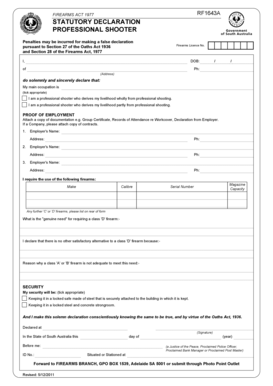
Filling out the Firearms - Professional Shooter Statutory Declaration RF1643a is an important step for individuals seeking to declare their professional shooting status. This guide provides clear, step-by-step instructions to help you complete the form effectively and accurately.
Follow the steps to successfully complete the statutory declaration.
- Click ‘Get Form’ button to obtain the form and open it for editing.
- Begin by entering your firearms licence number at the top of the form. Ensure this information is accurate as it is crucial for your declaration.
- Fill in your personal details, including your full name, date of birth, address, and phone number. It is important that this information is correct and complete.
- Indicate your main occupation by ticking the appropriate box to specify whether you derive your livelihood wholly or partly from professional shooting.
- Provide proof of employment by attaching necessary documentation such as a Group Certificate or Declaration from your employer. Ensure these documents are recent and relevant.
- List your employers' names and addresses, along with their contact numbers. You may need to include multiple entries, so ensure you fill in all applicable fields.
- Specify the firearms you require by entering the make, calibre, magazine capacity, and serial number of each item. If you need more space for additional firearms, use the back of the form.
- Clearly state your 'genuine need' for a class 'D' firearm, providing reasons why other classes of firearms may not suffice for your requirements.
- Indicate your preferred security measure by ticking the appropriate box attached to either a locked safe made of steel or a locked steel and concrete strongroom.
- Conclude the declaration by signing the form in front of an authorized witness, such as a Justice of the Peace or Proclaimed Police Officer. Ensure you fill in the date, location, and ID number of the witness.
- Once you have completed the form, save your changes, and consider downloading or printing a copy for your records. Finally, submit the form to the Firearms Branch as instructed.
Start filling out your Firearms - Professional Shooter Statutory Declaration RF1643a online today!