Loading
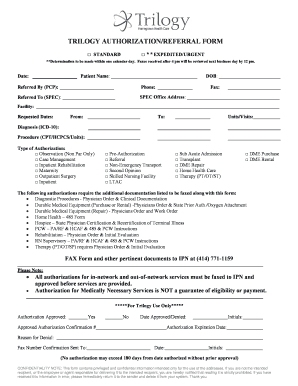
Get Referral Form - Trilogy Health Insurance
How it works
-

Open form follow the instructions
-

Easily sign the form with your finger
-

Send filled & signed form or save
How to fill out the Referral Form - Trilogy Health Insurance online
Filling out the Referral Form for Trilogy Health Insurance online can streamline the referral process for patients and healthcare providers alike. This guide provides a step-by-step approach to ensure that all necessary information is accurately captured.
Follow the steps to successfully complete the Referral Form.
- Click ‘Get Form’ button to access the Referral Form and open it in the document editor.
- Enter the date the form is being filled out in the designated field. This provides a clear reference for the referral submission.
- In the 'Patient Name' field, input the full name of the patient for whom the referral is being requested.
- Add the 'DOB' (date of birth) of the patient in the next field. This helps in verifying the patient’s identity.
- Provide the name of the referring provider in the 'Referred By (PCP)' section along with their contact information, specifically phone and fax number.
- In the 'Referred To (SPEC)' section, input the name of the specialist to whom the patient is being referred.
- Fill in the address of the specialist's office under 'SPEC Office Address', ensuring accuracy for timely communication.
- Specify the facility name where the services will be provided in the 'Facility' field.
- Indicate the requested dates for the referral, specifying 'From' and 'To' dates for the expected service period.
- Enter the number of 'Units/Visits' required for the services in the respective field.
- Complete the 'Diagnosis' section with the appropriate ICD-10 code detailing the patient's health condition.
- Provide relevant procedure codes in the 'Procedure' section, using CPT/HCPCS codes along with units.
- Select the 'Type of Authorization' needed by checking the appropriate boxes. Options include observation, case management, inpatient rehabilitation, outpatient surgery, and more.
- If you are submitting for additional authorizations, ensure to attach the required documentation as listed on the form.
- Once all fields are completed, review the form for accuracy, save any changes made, and prepare to share or print the completed form.
- Finally, fax the completed form along with any additional documents to the specified number for approval.
Complete your Referral Form online today for efficient processing and improved patient care.
Did you know that there is actually a difference between referrals and references? By definition, a reference is a person that will validate your claims be it a resume or as a past customer. A referral however, is a person that recommends one to another.
Industry-leading security and compliance
US Legal Forms protects your data by complying with industry-specific security standards.
-
In businnes since 199725+ years providing professional legal documents.
-
Accredited businessGuarantees that a business meets BBB accreditation standards in the US and Canada.
-
Secured by BraintreeValidated Level 1 PCI DSS compliant payment gateway that accepts most major credit and debit card brands from across the globe.