Loading
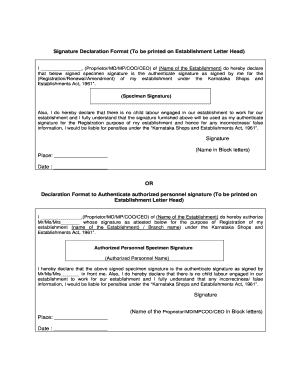
Get Signature Declaration Form
How it works
-

Open form follow the instructions
-

Easily sign the form with your finger
-

Send filled & signed form or save
How to fill out the Signature Declaration Form online
Filling out the Signature Declaration Form online is an essential step for registering or renewing your establishment under the Karnataka Shops and Establishments Act, 1961. This guide will provide you with clear instructions on completing each section of the form accurately and efficiently.
Follow the steps to complete the Signature Declaration Form online
- Click ‘Get Form’ button to obtain the form and open it in the editor.
- In the first section, enter your name and designation in the blank line. This should reflect your role, such as Proprietor, Managing Director, or Chief Executive Officer, followed by the name of your establishment.
- Provide your specimen signature in the designated area. Ensure that this signature is the one you will use for official purposes, as it will serve as your authenticated signature for the registration.
- Declare that there is no child labour engaged in your establishment by confirming this statement. This is an important legal requirement that emphasizes your commitment to ethical practices.
- Include the date and place of signing at the bottom of the form. This information helps in verifying the authenticity of the submission.
- If you are authorizing another person to sign on your behalf, fill in their name and title in the appropriate section. Provide their specimen signature and ensure they are present when you attest their signature.
- Review all entered information for accuracy. Once confirmed, you can save your changes, download the completed form, or share it as needed.
Complete your Signature Declaration Form online today to ensure compliance with regulations.
All the information provided in a declaration form must be specific. Avoid listing generic and unverifiable information. Always provide a heading or title for your declaration form. If you're listing events in the declaration form, always list them in chronological order.