We use cookies to improve security, personalize the user experience, enhance our marketing activities (including cooperating with our marketing partners) and for other business use.
Click "here" to read our Cookie Policy. By clicking "Accept" you agree to the use of cookies. Read less
Read more
Accept
Loading
Form preview
  • US Legal Forms
  • Form Library
  • More Forms
  • More Uncategorized Forms
  • Formulario Arivu - Ministerio De Hacienda - Transparenciafiscal Gob

Get Formulario Arivu - Ministerio De Hacienda - Transparenciafiscal Gob

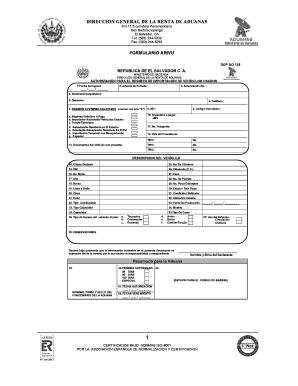
DIRECCION GENERAL DE LA RENTA DE ADUANAS Km 11.5 carretera Panamericana San Bartolo,Ilopango El Salvador, CA Tel: (503) 2445232 Fax: (503) 2445233 FORMULARIO ARIVU DOP GO 135 REPUBLICA DE EL SALVADOR.

How it works

  1. Open form

    Open form follow the instructions

  2. Easily sign form

    Easily sign the form with your finger

  3. Share form

    Send filled & signed form or save

How to fill out the Formulario ARIVU - Ministerio De Hacienda - Transparenciafiscal Gob online

Filling out the Formulario ARIVU is essential for the importation of used vehicles to El Salvador. This guide provides clear and comprehensive instructions to assist users in completing the form accurately online.

Follow the steps to successfully fill out the Formulario ARIVU.

  1. Click the ‘Get Form’ button to obtain the form and open it in the editor.
  2. In the first section, enter the 'Fecha de Ingreso' (date of entry) following the format dd/mm/yyyy. Ensure accuracy as this date is important.
  3. Specify the 'Aduana de Entrada' (customs office of entry) name, such as Hachadura or Comalapa.
  4. Enter the 'Autorización No.' that you receive from the customs system, leaving this blank if not applicable.
  5. Provide the 'Nombre (Consignatario)' (name of the consignee) and their complete 'Dirección' (address). This includes contact information if the consignee is a foreign resident.
  6. Fill in the 'Teléfono' (telephone number) with a fixed and/or mobile number where the consignee can be reached.
  7. Indicate the 'REGIMEN O PERMISO SOLICITADO' (type of importation regime) by placing an 'X' in the appropriate box.
  8. If applicable, enter the consignee's 'NIT' (Tax Identification Number) without any spaces or dashes.
  9. Input the 'Código Importador' (Importer Code), if registered, to identify authorized importers.
  10. Detail the total 'Impuestos a pagar' (taxes to be paid) in US Dollars, referring to the official tables provided by the Ministry of Finance.
  11. Enter the 'No. Pasaporte' (passport number) of the consignee and specify the 'País de Procedencia' (country of origin) for the passport.
  12. List the documents related to the vehicle as per 'Documentos del vehículo que presenta', ensuring to provide all required titles or declarations.
  13. Provide the 'Descripción del vehículo' (vehicle description) by filling in the fields including 'Chasis Grabado', 'VIN', 'No. Motor', year, make, and model.
  14. Complete additional vehicle details such as weight, number of cylinders, and fuel type.
  15. Lastly, include any necessary 'OBSERVACIONES' (observations) about the information provided.
  16. Review all entries for accuracy and completeness. Save changes, and select options to download, print, or share the completed form.

Complete your Formulario ARIVU online today to ensure a smooth importation process.

Get form

Experience a faster way to fill out and sign forms on the web. Access the most extensive library of templates available.
Get form

Related content

(PDF) Programa USAID de Aduanas y Clima de...
Jun 10, 2008 — Formulario Aduanero Único Centroamericano...
Learn more

Related links form

RESNA SMS Application Materials Checklist 2019 IT Agenzia Delle Entrate Richiesta Di Registrazione E Adempimenti Successivi Contratti Di Locazione 2020 RESNA SMS Application Materials Checklist 2012 AOA Foundation Application Worksheet For Vision USA Services 2016

Questions & Answers

Get answers to your most pressing questions about US Legal Forms API.

Contact support

How Do You Redact In Word Document Open the word document that you want to redact. Select the text that you want to redact. ... Go to the "Review" tab in the ribbon. In the "Protect" group, click the "Restrict Editing" button. In the "Restrict Formatting and Editing" pane, click the "Start Enforcing Protection" button.

How to black out text in a PDF file Open your PDF in Adobe's Acrobat online services. Select Tools, then Redact. Select text. Either double-click to select the text or drag to select lines of text. Apply redaction. Once you've selected the text you want to remove, click Save to apply the changes and save the document.

Open the PDF in Acrobat, and then do one of the following: Choose Tools > Redact. On the Edit menu, choose Redact Text & Images. Select the text or image in a PDF, right-click, and select Redact.

Redact sensitive content (Acrobat Pro) Choose Tools > Redact. On the Edit menu, choose Redact Text & Images. Select the text or image in a PDF, right-click, and select Redact. Select the text or image in a PDF, choose Redact in the floating context-menu.

How to black out text in a PDF file Open your PDF in Adobe's Acrobat online services. Select Tools, then Redact. Select text. Either double-click to select the text or drag to select lines of text. Apply redaction. Once you've selected the text you want to remove, click Save to apply the changes and save the document.

There are a few ways you can redact the information you have in Word: 1) Both Windows and Mac users can use the "Inspect Document" tool to remove metadata, such as the author name, from a document, 2) You can replace the text you want to redact with another character, like "x" and black that out with formatting tools, ...

Sanitize your documents. Choose Tools › Redact. Click Sanitize Document in the top toolbar. Choose to selectively remove hidden information or remove all by clicking OK. Choose Save As… and save the file with a different name to avoid overwriting the original.

Click on the Edit tab at the top of the screen. Select Redact Text & Images. From there, you'll be able to add new redactions or remove the existing ones. Once you remove the redactions, the colored bars will go away, revealing the information underneath.

Open the document in the PDF editor. Select Tools > Edit PDF > Add Text. Drag the new text box to the preferred location. Add text to the box and choose the formatting options.

Click the drop-down menu next to the Redact Text & Images box, and select Redaction Tool Properties. Pick outline and fill colors for the redacted area, or click Use Overlay Text.

Get This Form Now!

Use professional pre-built templates to fill in and sign documents online faster. Get access to thousands of forms.
Get form
If you believe that this page should be taken down, please follow our DMCA take down processhere.

Industry-leading security and compliance

US Legal Forms protects your data by complying with industry-specific security standards.
  • In businnes since 1997
    25+ years providing professional legal documents.
  • Accredited business
    Guarantees that a business meets BBB accreditation standards in the US and Canada.
  • Secured by Braintree
    Validated Level 1 PCI DSS compliant payment gateway that accepts most major credit and debit card brands from across the globe.
Get Formulario ARIVU - Ministerio De Hacienda - Transparenciafiscal Gob
Get form
Form Packages
Adoption
Bankruptcy
Contractors
Divorce
Home Sales
Employment
Identity Theft
Incorporation
Landlord Tenant
Living Trust
Name Change
Personal Planning
Small Business
Wills & Estates
Packages A-Z
Form Categories
Affidavits
Bankruptcy
Bill of Sale
Corporate - LLC
Divorce
Employment
Identity Theft
Internet Technology
Landlord Tenant
Living Wills
Name Change
Power of Attorney
Real Estate
Small Estates
Wills
All Forms
Forms A-Z
Form Library
Customer Service
Terms of Service
Privacy Notice
Legal Hub
Content Takedown Policy
Bug Bounty Program
About Us
Help Portal
Legal Resources
Blog
Affiliates
Contact Us
Delete My Account
Site Map
Industries
Forms in Spanish
Localized Forms
State-specific Forms
Forms Kit
Legal Guides
Real Estate Handbook
All Guides
Prepared for You
Notarize
Incorporation services
Our Customers
For Consumers
For Small Business
For Attorneys
Our Sites
US Legal Forms
USLegal
FormsPass
pdfFiller
signNow
airSlate WorkFlow
DocHub
Instapage
Social Media
Call us now toll free:
+1 833 426 79 33
As seen in:
  • USA Today logo picture
  • CBC News logo picture
  • LA Times logo picture
  • The Washington Post logo picture
  • AP logo picture
  • Forbes logo picture
© Copyright 1997-2025
airSlate Legal Forms, Inc.
3720 Flowood Dr, Flowood, Mississippi 39232
Form Packages
Adoption
Bankruptcy
Contractors
Divorce
Home Sales
Employment
Identity Theft
Incorporation
Landlord Tenant
Living Trust
Name Change
Personal Planning
Small Business
Wills & Estates
Packages A-Z
Form Categories
Affidavits
Bankruptcy
Bill of Sale
Corporate - LLC
Divorce
Employment
Identity Theft
Internet Technology
Landlord Tenant
Living Wills
Name Change
Power of Attorney
Real Estate
Small Estates
Wills
All Forms
Forms A-Z
Form Library
Customer Service
Terms of Service
Privacy Notice
Legal Hub
Content Takedown Policy
Bug Bounty Program
About Us
Help Portal
Legal Resources
Blog
Affiliates
Contact Us
Delete My Account
Site Map
Industries
Forms in Spanish
Localized Forms
State-specific Forms
Forms Kit
Legal Guides
Real Estate Handbook
All Guides
Prepared for You
Notarize
Incorporation services
Our Customers
For Consumers
For Small Business
For Attorneys
Our Sites
US Legal Forms
USLegal
FormsPass
pdfFiller
signNow
airSlate WorkFlow
DocHub
Instapage
Social Media
Call us now toll free:
+1 833 426 79 33
As seen in:
  • USA Today logo picture
  • CBC News logo picture
  • LA Times logo picture
  • The Washington Post logo picture
  • AP logo picture
  • Forbes logo picture
© Copyright 1997-2025
airSlate Legal Forms, Inc.
3720 Flowood Dr, Flowood, Mississippi 39232