Loading
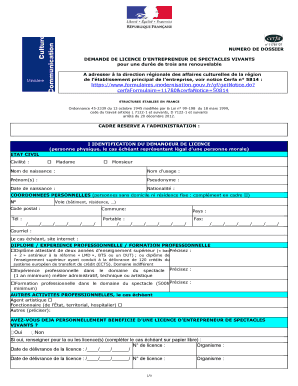
Get Cerfa N 11781 - Associatheque
How it works
-

Open form follow the instructions
-

Easily sign the form with your finger
-

Send filled & signed form or save
How to fill out the Cerfa N 11781 - Associatheque online
The Cerfa N 11781 - Associatheque form is a crucial document for individuals and organizations wishing to obtain a license for live performances in France. This guide provides clear, step-by-step instructions to help you fill out the form accurately and efficiently online.
Follow the steps to complete your application successfully.
- Click ‘Get Form’ button to obtain the form and open it in the editor.
- Begin filling out Section I, which requires the identification of the license applicant. Input your civil status, birth name, and legal names where applicable. Ensure your date of birth and nationality are accurate.
- In this section, you will also provide your personal contact information, including your address, phone numbers, and email. Pay special attention to the format for your phone numbers.
- Proceed to provide your academic qualifications, relevant professional experiences, or specific training in the performance sector. Indicate the type of qualification or experience and provide detailed descriptions as needed.
- If applicable, mention any other professional roles you hold, such as agent or public servant.
- Answer the question about whether you have previously held a live performance license. If yes, provide the relevant license number, the issuing body, and the dates of issuance.
- Move on to Section II to fill in details about the organization if you are representing one. This includes the SIREN or SIRET number, main activity, and organizational name.
- Provide the main establishment's contact information. If the address is the same as your personal address, indicate so.
- In Section III, specify the legal structure of the organization by selecting the appropriate box. Review the different types and select only one.
- Fill in Section IV with the type of structure for your organization focusing on performance activities.
- Complete Section V by selecting the applicable collective agreement or confirming the absence of one.
- In Section VI, indicate any current relationships with public powers and provide relevant details regarding existing conventions or subsidies.
- Fill in Section VII with your role within the organization. Ensure to select only one position that accurately reflects your function.
- In Section VIII, clarify the primary activities envisioned relating to live performances. Choose the most appropriate option.
- In Section IX, select the category of the license you are applying for. Note any additional information required if applying for a touring entrepreneur license.
- Conclude by signing the declaration section, affirming the accuracy of provided information, and ensuring all necessary documents are attached.
- Finally, review your form thoroughly for any errors, save changes, and prepare to download or print it for submission.
Complete your documents online and ensure your application is submitted correctly.
Using Shift + left click. Using Ctrl + left click (command + left click on Mac) Clicking the top left corner of the spreadsheet or using Ctrl + A (command + A on Mac) to redact the entire spreadsheet. Note: Redacting a sheet automatically redacts all charts/images in the sheet.