Loading
Get Skating Coach Contract - Cafscorg - Cafsc
How it works
-

Open form follow the instructions
-

Easily sign the form with your finger
-

Send filled & signed form or save
How to fill out the Skating Coach Contract - Cafscorg - Cafsc online
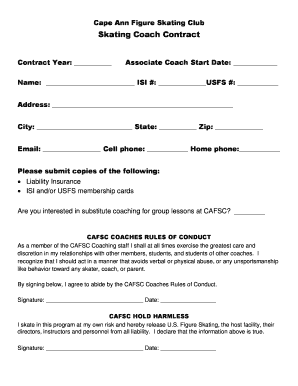
Filling out the Skating Coach Contract is an essential process for coaches affiliated with the Cape Ann Figure Skating Club. This guide provides clear instructions to help you complete the contract accurately and efficiently.
Follow the steps to complete the Skating Coach Contract online.
- Click ‘Get Form’ button to obtain the Skating Coach Contract and open it in the editor.
- Enter the contract year in the designated field to indicate the time period covered by the contract.
- Fill in the associate coach start date to specify when the coaching position begins.
- Provide your full name along with your ISI and USFS membership numbers. This information is essential for verification.
- Complete your address details, including city, state, and zip code, to allow for proper contact and identification.
- Include your email address, cell phone number, and home phone number for correspondence related to your coaching responsibilities.
- Submit copies of your liability insurance and your ISI and/or USFS membership cards by uploading them in the appropriate field.
- Indicate your interest in substitute coaching for group lessons at CAFSC by marking the provided box.
- Read through the CAFSC Coaches Rules of Conduct thoroughly, ensuring you understand your responsibilities as a coach.
- Sign and date the document to acknowledge your commitment to the Coaches Rules of Conduct.
- Review the CAFSC Hold Harmless statement carefully, as it releases certain parties from liability, then sign and date this section.
- Once you have completed all required fields and sections, you can save the changes, download the completed contract, print it, or share it as needed.
Complete your Skating Coach Contract online today to start your coaching journey!
You cannot edit Bates page numbering after you've added it to a document. You can, however, delete Bates numbering and apply a different Bates numbering formula.