Loading
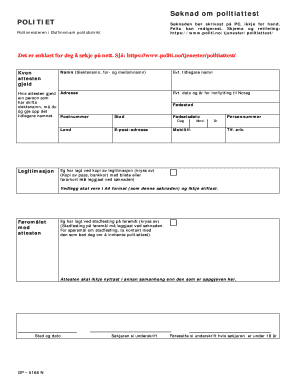
Get Sknad
How it works
-

Open form follow the instructions
-

Easily sign the form with your finger
-

Send filled & signed form or save
How to fill out the Sknad online
Filling out the Sknad online can be a straightforward process if you follow the right steps. This guide will help you navigate each section of the form to ensure you provide all necessary information correctly.
Follow the steps to complete the Sknad online efficiently.
- Click the ‘Get Form’ button to acquire the Sknad and open it in your preferred online editor.
- Begin by entering the name of the person the certificate pertains to, including their surname and any given or middle names. If the individual has changed their surname, include their previous name as well.
- Provide the current address for the individual, including the postal code and country.
- Input identification details. If applicable, mention any former names and the date and year of moving to Norway.
- Fill in the birthplace and date of birth of the individual. Ensure the birthdate format is clear, including day, month, and year.
- Enter a valid email address and a mobile phone number for contact purposes.
- Include the personal identification number of the individual, along with their work phone number if relevant.
- Indicate if you have attached a copy of the required identification documents by checking the box provided. Remember to include an A4 format copy of a passport, bank card with a photo, or driver's license with the application.
- State the purpose for obtaining the certificate. Check the box to confirm that you have included proof of purpose, which is necessary to proceed with your application.
- Finalize the application by signing and dating the form. If the applicant is under 18 years of age, a parent or guardian must also sign.
- Review all entered information for accuracy, then save your changes. You may choose to download, print, or share the completed form as needed.
Complete your Sknad online today for a smooth application process!
0:33 1:18 Two simple tricks to remove any watermark in Word document YouTube Start of suggested clip End of suggested clip Options. And then you will be able to select this watermark. By clicking over it. And then you canMoreOptions. And then you will be able to select this watermark. By clicking over it. And then you can press delete. So that's how you delete a watermark. So that's all in this video.