We use cookies to improve security, personalize the user experience, enhance our marketing activities (including cooperating with our marketing partners) and for other business use.
Click "here" to read our Cookie Policy. By clicking "Accept" you agree to the use of cookies. Read less
Read more
Accept
Loading
Form preview
  • US Legal Forms
  • Form Library
  • More Forms
  • More Uncategorized Forms
  • Table Captain Packet - Habitat For Humanity Seattle-king County - Habitatskc

Get Table Captain Packet - Habitat For Humanity Seattle-king County - Habitatskc

Building Homes Changing Lives ANNUAL HABITAT BENEFIT LUNCHEON Tuesday, March 22nd, 2016 Washington State Convention Center Noon to 1:00 pm TABLE C A PTA I N G U I D E REGISTER TODAY: www.habitatskc.org/.

How it works

  1. Open form

    Open form follow the instructions

  2. Easily sign form

    Easily sign the form with your finger

  3. Share form

    Send filled & signed form or save

How to use or fill out the Table Captain Packet - Habitat For Humanity Seattle-King County - Habitatskc online

This guide provides a comprehensive overview of how to fill out the Table Captain Packet for Habitat for Humanity Seattle-King County. By following these steps, you will ensure a successful registration and participation in the annual benefit luncheon.

Follow the steps to complete the Table Captain Packet effectively.

  1. Click the ‘Get Form’ button to obtain the form and open it in your preferred editor.
  2. Begin by filling in your contact details as the Table Captain. Ensure your name, email address, and phone number are accurate, as this information is crucial for communication regarding the luncheon.
  3. Compile a list of your invitees. You need to include at least ten guests to fill a table. Make sure to collect their names, emails, and any relevant contact information.
  4. Make use of the sample email invite provided in the packet. Personalize it with your name and reasons for supporting Habitat for Humanity, and then send it to your guests.
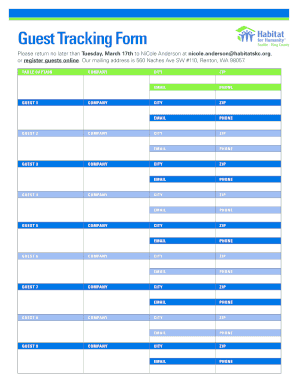
  5. Once your guests confirm their attendance, input their details into the Guest Tracking Form included in the packet. Double-check the spelling of names and other important information.
  6. Submit your completed Guest Tracking Form by the due date specified in the packet to ensure all guests receive confirmation emails.
  7. As the event approaches, send personal reminder messages to your guests to encourage their attendance. You may follow up with a phone call or text as needed.
  8. On the day of the luncheon, arrive early to meet your guests and ensure seating arrangements are clear. Collect the donation forms during the event.
  9. After the luncheon, send a thank-you message to your guests, expressing gratitude for their support and encouraging future engagement.
  10. Finally, you can save your form, download it for your records, or share it as necessary.

Complete your Table Captain Packet online today and contribute to building homes and communities!

Get form

Experience a faster way to fill out and sign forms on the web. Access the most extensive library of templates available.
Get form

Related content

King County Official Local Voters' Pamphlet
Aug 2, 2016 — Download a registration form from the King County Elections website....
Learn more
Program PDF - UW Departments Web Server...
Mar 25, 2013 — Table of Contents. 1. ... Extra tickets may be included with your badge...
Learn more

Related links form

Kerala E Gazette Uams Mychart Appellants Emergency Motion For A Stay Pending Appeal Without Attachments Affidavit Of Demolition Philippines

Questions & Answers

Get answers to your most pressing questions about US Legal Forms API.

Contact support

Choose Tools > Redact. On the Edit menu, choose Redact Text & Images. Select the text or image in a PDF, right-click, and select Redact.

Answer: When a document is redacted, it means that certain text contained in a document filed with the Court is concealed from view for privacy protection. This is an example of how a redaction will appear on a document; with the private information concealed: .

Best practices for redacting a PDF Make a copy of the original PDF. Use a different color or font for the redacted text to stand out from the rest of the document. Use a highlighter or other marking tool to identify the confidential data you want to remove. Redact the data using a PDF editing program.

Click and drag your cursor across the text you want to redact to do so. drop-down arrow to the right of the ab highlighter bar, which is in the "Font" section of the Home tab. A drop-down menu with different colored boxes will appear. Click the black box.

Cut out the text that needs to be redacted. Use scissors to cut out all the text you need to redact. Make sure you find every mention of the sensitive information in the paper document and cut it out. NOTE: You should then shred the paper clippings to ensure the cut-out information cannot be traced or found.

Personal info and family data- Keeping personal identity safe is of utmost importance. Redacting personal data can protect your identity and keep you safe. It includes maiden names, last names, addresses, birth dates, etc.

Sanitize your documents. Choose Tools › Redact. Click Sanitize Document in the top toolbar. Choose to selectively remove hidden information or remove all by clicking OK. Choose Save As… and save the file with a different name to avoid overwriting the original.

In law, “redacted” means editing a document to remove sensitive or private information before sharing it. This process ensures that confidential data, such as personal addresses or financial details, remains hidden from public view, preserving privacy and complying with legal requirements.

leasing out means the leasing of land by a Land owner - Lessor to a Lessee Cultivator for an agreed lease period for a consideration which could be in cash or kind or share of produce; Sample 1Sample 2. leasing out means the transfer of land by a Land owner.

Redaction Steps Activate the tool by clicking on the Redaction Tool button on the Document Tab or using the shortcut key Ctrl + Shift + Y (⌘ + Shift + Y on Mac). Begin marking the content that you wish to be redacted.

Get This Form Now!

Use professional pre-built templates to fill in and sign documents online faster. Get access to thousands of forms.
Get form
If you believe that this page should be taken down, please follow our DMCA take down processhere.

Industry-leading security and compliance

US Legal Forms protects your data by complying with industry-specific security standards.
  • In businnes since 1997
    25+ years providing professional legal documents.
  • Accredited business
    Guarantees that a business meets BBB accreditation standards in the US and Canada.
  • Secured by Braintree
    Validated Level 1 PCI DSS compliant payment gateway that accepts most major credit and debit card brands from across the globe.
Get Table Captain Packet - Habitat For Humanity Seattle-King County - Habitatskc
Get form
Form Packages
Adoption
Bankruptcy
Contractors
Divorce
Home Sales
Employment
Identity Theft
Incorporation
Landlord Tenant
Living Trust
Name Change
Personal Planning
Small Business
Wills & Estates
Packages A-Z
Form Categories
Affidavits
Bankruptcy
Bill of Sale
Corporate - LLC
Divorce
Employment
Identity Theft
Internet Technology
Landlord Tenant
Living Wills
Name Change
Power of Attorney
Real Estate
Small Estates
Wills
All Forms
Forms A-Z
Form Library
Customer Service
Terms of Service
Privacy Notice
Legal Hub
Content Takedown Policy
Bug Bounty Program
About Us
Help Portal
Legal Resources
Blog
Affiliates
Contact Us
Delete My Account
Site Map
Industries
Forms in Spanish
Localized Forms
State-specific Forms
Forms Kit
Legal Guides
Real Estate Handbook
All Guides
Prepared for You
Notarize
Incorporation services
Our Customers
For Consumers
For Small Business
For Attorneys
Our Sites
US Legal Forms
USLegal
FormsPass
pdfFiller
signNow
airSlate WorkFlow
DocHub
Instapage
Social Media
Call us now toll free:
+1 833 426 79 33
As seen in:
  • USA Today logo picture
  • CBC News logo picture
  • LA Times logo picture
  • The Washington Post logo picture
  • AP logo picture
  • Forbes logo picture
© Copyright 1997-2025
airSlate Legal Forms, Inc.
3720 Flowood Dr, Flowood, Mississippi 39232
Form Packages
Adoption
Bankruptcy
Contractors
Divorce
Home Sales
Employment
Identity Theft
Incorporation
Landlord Tenant
Living Trust
Name Change
Personal Planning
Small Business
Wills & Estates
Packages A-Z
Form Categories
Affidavits
Bankruptcy
Bill of Sale
Corporate - LLC
Divorce
Employment
Identity Theft
Internet Technology
Landlord Tenant
Living Wills
Name Change
Power of Attorney
Real Estate
Small Estates
Wills
All Forms
Forms A-Z
Form Library
Customer Service
Terms of Service
Privacy Notice
Legal Hub
Content Takedown Policy
Bug Bounty Program
About Us
Help Portal
Legal Resources
Blog
Affiliates
Contact Us
Delete My Account
Site Map
Industries
Forms in Spanish
Localized Forms
State-specific Forms
Forms Kit
Legal Guides
Real Estate Handbook
All Guides
Prepared for You
Notarize
Incorporation services
Our Customers
For Consumers
For Small Business
For Attorneys
Our Sites
US Legal Forms
USLegal
FormsPass
pdfFiller
signNow
airSlate WorkFlow
DocHub
Instapage
Social Media
Call us now toll free:
+1 833 426 79 33
As seen in:
  • USA Today logo picture
  • CBC News logo picture
  • LA Times logo picture
  • The Washington Post logo picture
  • AP logo picture
  • Forbes logo picture
© Copyright 1997-2025
airSlate Legal Forms, Inc.
3720 Flowood Dr, Flowood, Mississippi 39232