Loading
Get Meeting Reminder Notice
How it works
-

Open form follow the instructions
-

Easily sign the form with your finger
-

Send filled & signed form or save
How to fill out the Meeting Reminder Notice online
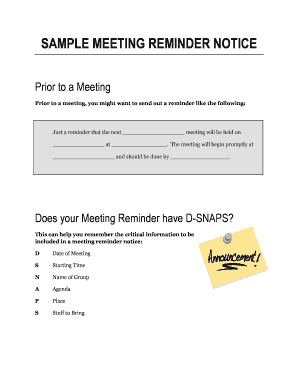
A Meeting Reminder Notice is essential for ensuring that all participants are informed about an upcoming meeting. This guide provides a step-by-step approach to completing the form online with clarity and ease.
Follow the steps to fill out the Meeting Reminder Notice effectively.
- Click ‘Get Form’ button to obtain the form and open it in the editor.
- Begin by entering the name of the group in the designated field. This should clearly reflect the group or organization holding the meeting.
- Next, specify the date of the meeting in the provided section, ensuring the format aligns with standard date conventions.
- Then, input the starting time of the meeting. Make sure to include whether it is AM or PM to avoid confusion.
- In the agenda section, list the topics or points to be discussed during the meeting. Succinctly outline each item.
- Fill in the place where the meeting will take place. This could be a physical location or specify if it will be a virtual meeting.
- Lastly, note any items that participants should bring to the meeting in the designated 'stuff to bring' section.
- Once all fields are filled, review the information for accuracy, then save your changes, download, print, or share the completed form as necessary.
Complete your Meeting Reminder Notice online today!
Here is a list of best practices you should be following when writing a reminder. Choose a clear subject line. ... Be friendly, yet direct. ... Be brief. ... Include a CTA. ... Find the right sending time. ... Follow up more than once if needed. ... Use it as a marketing opportunity.