Loading
Get Sba 641 Counseling Information Form - Rei Business Lending
How it works
-

Open form follow the instructions
-

Easily sign the form with your finger
-

Send filled & signed form or save
How to fill out the SBA 641 Counseling Information Form - REI Business Lending online
Filling out the SBA 641 Counseling Information Form is a crucial step for individuals seeking business counseling services. This guide provides a clear and straightforward approach to completing this form online, ensuring users can easily navigate each section while providing the necessary information.
Follow the steps to fill out the SBA 641 Counseling Information Form successfully.
- Press the ‘Get Form’ button to access the SBA 641 Counseling Information Form and open it in your preferred online editor.
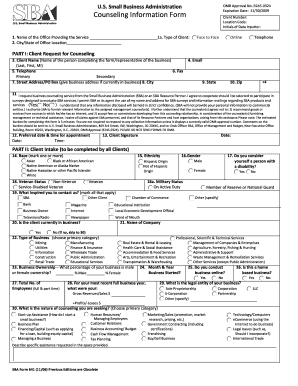
- In section 1, enter the name of the office providing your counseling service, along with the type of client (select options for face-to-face, online, or telephone). Fill in the city and state of the office location.
- Complete Part I by providing your name (first, last, and middle initial), telephone numbers (primary and secondary), email address, and physical address. Ensure to provide accurate contact information.
- Indicate your request for business counseling services in item 11. Review and check the boxes regarding your willingness to participate in surveys and the confidentiality statement, ensuring you understand your rights regarding personal information.
- Specify your preferred date and time for your appointment in item 12, and sign and date the form in item 13 to confirm your request and acknowledgment.
- In Part II, all clients must complete items 14 through 30. Begin by marking your race and ethnicity and indicating veteran status.
- Provide additional information such as business ownership percentages, the nature of your business, and whether it operates online. Include details about your business plan, revenues, and the specific assistance you are seeking in item 30.
- After completing all sections, review the information for accuracy, make any necessary changes, and save your updates. You can then download, print, or share the form as needed.
Complete your SBA 641 Counseling Information Form online today and take the first step towards receiving essential business counseling.
Best practices for redacting a PDF Make a copy of the original PDF. Use a different color or font for the redacted text to stand out from the rest of the document. Use a highlighter or other marking tool to identify the confidential data you want to remove. Redact the data using a PDF editing program.
Industry-leading security and compliance
US Legal Forms protects your data by complying with industry-specific security standards.
-
In businnes since 199725+ years providing professional legal documents.
-
Accredited businessGuarantees that a business meets BBB accreditation standards in the US and Canada.
-
Secured by BraintreeValidated Level 1 PCI DSS compliant payment gateway that accepts most major credit and debit card brands from across the globe.