Loading
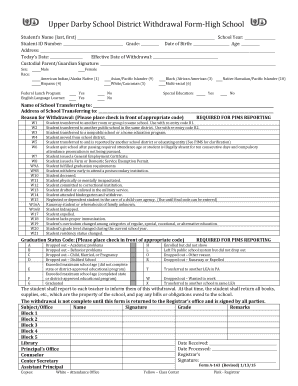
Get Upper Darby School District Withdrawal Form-high School
How it works
-

Open form follow the instructions
-

Easily sign the form with your finger
-

Send filled & signed form or save
How to fill out the Upper Darby School District Withdrawal Form-High School online
Filling out the Upper Darby School District Withdrawal Form for high school students can seem daunting, but this guide offers a clear process to ensure that you complete it accurately online. Follow the step-by-step instructions to navigate each section of the form with confidence.
Follow the steps to fill out the form online seamlessly.
- Press the ‘Get Form’ button to access the Upper Darby School District Withdrawal Form-High School. This will open the document in a digital format ready for completion.
- Begin with the student's name, entering the last name followed by the first name in the designated fields.
- Fill in the school year, student ID number, and the current grade of the student in the appropriate fields.
- Provide the date of birth and age of the student, ensuring accuracy for each input.
- Complete the address section with the student's current residence details.
- Record today's date and note the effective date of withdrawal in their respective sections.
- Obtain the signature of the custodial parent or guardian in the designated area.
- Indicate the student’s sex and race by selecting the appropriate boxes.
- Answer the questions regarding participation in the federal lunch program and English language learner status with a simple yes or no.
- Indicate whether the student has received special education services.
- In the section for the school transferring to, provide the name and address of the new institution.
- Select the appropriate reason for withdrawal by checking the related code; ensure it is marked clearly.
- Choose the graduation status code by checking the relevant option from the provided list.
- Ensure the section that discusses returning all school property and settling any financial obligations is understood and acknowledged.
- Finally, check for any remaining signatures required from school officials in the designated areas.
- Once all fields are completed and verified, save the document, and use the option to download or print it for submission.
Complete your documents online to ensure a smooth withdrawal process.
Hours of Operation are Monday - Friday from 7:30 am to 3:00 pm.
Industry-leading security and compliance
US Legal Forms protects your data by complying with industry-specific security standards.
-
In businnes since 199725+ years providing professional legal documents.
-
Accredited businessGuarantees that a business meets BBB accreditation standards in the US and Canada.
-
Secured by BraintreeValidated Level 1 PCI DSS compliant payment gateway that accepts most major credit and debit card brands from across the globe.